Many people run into ridiculous but real problems the first time they buy an MPO breakout cable (MPO to LC harness): the specs look correct, the connectors mate without issue, yet the link simply won't come up. Or worse-the link light is on, but once traffic starts flowing you see packet loss and soaring bit errors. After troubleshooting, it turns out the optics aren't faulty at all. The root cause is usually one of the basics being wrong: polarity (Type A/B/C) doesn't match, MPO gender/pinning (pinned vs. unpinned) is mismatched, or the fiber count doesn't align with the breakout scheme-leading to rework, cable swaps, and sometimes rebuilding the entire link.
The goal of this article is simple: stop guessing. We'll break MPO breakout selection down into a repeatable 5-step choosing process, then pair it with practical installation and usage steps (label check on arrival, cleaning, correct keying/orientation, breakout leg routing, and link-up verification). Finally, we'll include a common mistakes and troubleshooting checklist to block the most frequent failure points before they happen. Follow this guide and you'll move from "buying cables by luck" to making the right choice with confidence-and lighting up the link on the first try.
What Is an MPO Breakout Cable?

MPO Breakout Cable definition
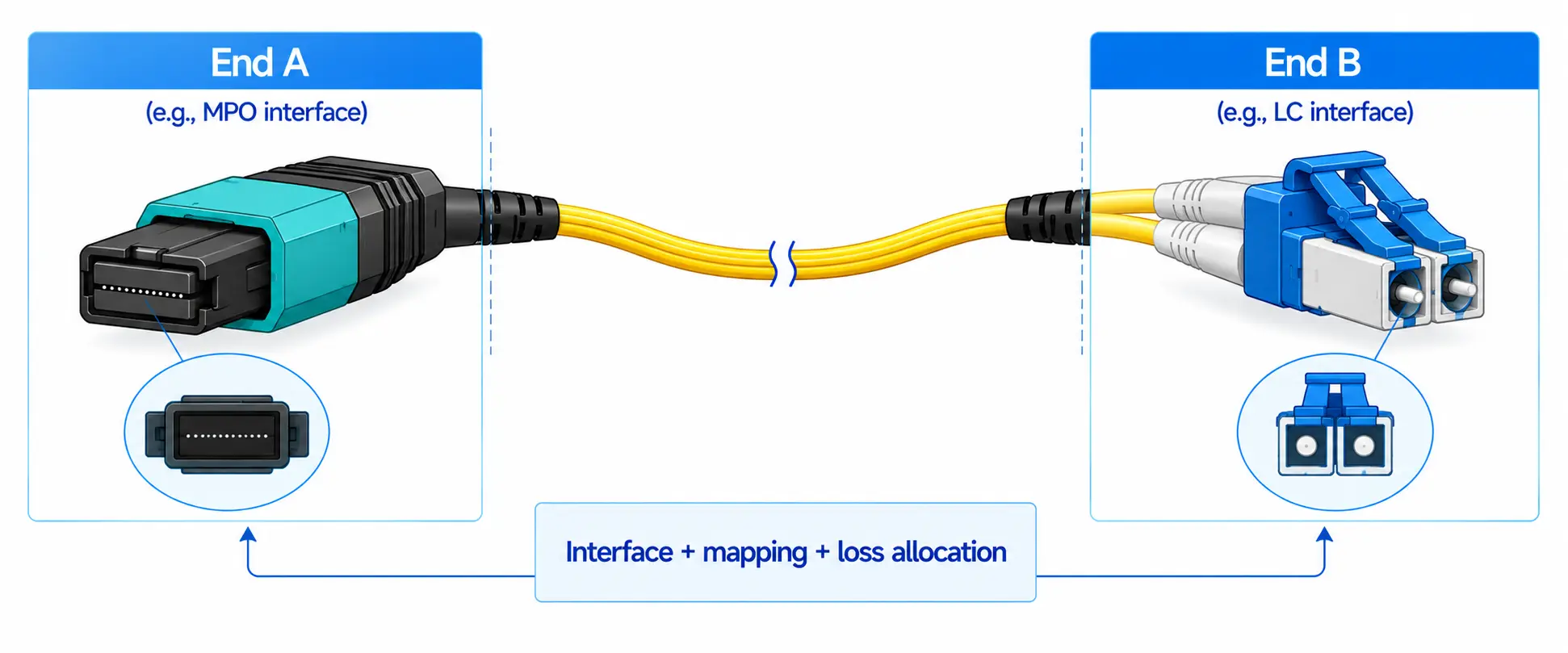
An MPO breakout cable has an MPO/MTP connector on one end (parallel fiber) and multiple duplex connectors on the other end (most commonly LC duplex), used to turn one high-speed parallel port into multiple duplex ports.
How to use the terms "Breakout / Harness / Fanout"
In practice, breakout, harness, and fanout are often used interchangeably across the industry. In this article, we'll use "MPO breakout cable (also called an MPO harness/fanout cable)" on first mention, and then simply refer to it as a breakout (harness) for consistency.
Breakout vs. Trunk / Cassette-what's the difference?
Trunk cable: MPO/MTP on both ends, typically used as the backbone in a structured cabling system, often paired with cassettes/modules and patch panels for flexible distribution.
Breakout cable: MPO/MTP on one end and duplex connectors on the other, designed more for direct equipment-side breakouts-usually shorter runs, faster deployment, and simpler "plug-and-play" connections between a parallel port and multiple duplex ports.
When Do You Need a Breakout Cable?

Port breakout
The classic use case is breaking out a high-speed parallel port (100G/200G/400G) into multiple duplex links. In plain terms, you're connecting an upstream switch (with an MPO-based port) to downstream servers or a distribution/patching area where the interfaces are duplex (usually LC duplex).
This is especially common when you want to maximize port utilization-one high-speed uplink can feed multiple lower-speed duplex connections without redesigning the whole cabling system.
In-rack / inter-rack connectivity
Breakout cables are also widely used for short, high-density runs:
Inside a rack: cleanly fan out from a dense switch port to multiple server-facing duplex ports
Between nearby racks: reduce patch-cord "spaghetti" and make routing more predictable
They work best when distances are short, and when moves/adds/changes happen frequently, because a breakout harness is fast to deploy and easy to swap.
When you should not use a breakout cable?
Breakouts aren't always the right tool. Consider alternatives when:
Runs are long, or you need strong maintainability and future expansion → a trunk + cassette/module (structured cabling) approach is usually cleaner and easier to scale.
The project follows a strict structured cabling standard/spec → follow the system design (panels, trunks, cassettes) rather than forcing a harness into a framework it wasn't designed for.
The 5 Critical Specs You Must Understand

Fiber count: Base-8 vs. Base-12 vs. Base-24
Before you pick polarity or length, make sure the fiber count matches the interface and breakout plan. A higher fiber count is not automatically better-it can actually create compatibility issues or waste fibers.
Common combinations (quick reference):
| MPO/MTP Fiber Count | Typical Breakout Side | What It's Commonly Used For |
|---|---|---|
| 8-fiber (Base-8) | 4 × LC duplex | Base-8 parallel optics breakouts (very common in modern DC) |
| 12-fiber (Base-12) | 6 × LC duplex | Legacy Base-12 structured cabling / certain breakout needs |
| 24-fiber (Base-24) | 12 × LC duplex | Higher-density distribution / multiple duplex drops |
Strong reminder: Don't select based on "more fibers = more future-proof." Select based on what your switch port / transceiver type / cabling system actually expects.
Fiber type & grade: OS2 / OM3 / OM4 / OM5
This choice is mostly about distance and environment, and it should align with your optics.
OM3 / OM4 / OM5 (multimode): typically for short-reach links inside data centers (rack/row/building-scale, depending on optics).
OS2 (single-mode): for longer distances (campus/metro), higher reach requirements, and when single-mode optics are specified.
Quick way to decide:
If your optics are SR (short-reach multimode), you're almost certainly in OM3/OM4 territory.
If your optics are LR/ER/DR/FR (single-mode naming varies by standard), choose OS2.
If you're unsure, don't guess-confirm the transceiver spec first, then match the cable.
Polarity: Type A / Type B / Type C (the core issue)
Polarity is the fiber map that ensures Tx lands on Rx at the other end. You can have the right fiber type and the right connectors-and still get a dead link if polarity is wrong.
Basic mapping characteristics (include a diagram in your article):
- Type A (straight-through): fiber positions remain aligned end-to-end (commonly described as "straight").
- Type B (reversed): the fiber order is reversed end-to-end (often used to achieve Tx/Rx crossover depending on the system).
- Type C (pair-flipped): fibers flip in pairs (1↔2, 3↔4, etc.), typically used in specific structured polarity methods.
Strong reminder: "Default" doesn't mean "correct." Polarity must match the link design (direct attach vs. panels/cassettes, method A/B/C, how many MPO interfaces are in the channel).
MPO gender & pinning: Pinned vs. Unpinned
MPO/MTP connectors come in two mating styles:
- Pinned (male): has alignment pins
- Unpinned (female): no pins; mates with the pinned side
- Pins are not a "premium feature"-they're simply part of the mechanical alignment system, and the mating pair must be correct.
- Strong reminder: You can end up with a situation where something "seems like it fits" (or forces together) but is not the correct mating configuration, which risks poor alignment, damaged ferrules, or unreliable performance. Always confirm pinning requirements for the equipment/adapter path.
End-face polish & connector types: UPC/APC, MPO/MTP, LC variants
A few connector details matter more than people expect:
UPC vs. APC:
UPC is the most common polish in data centers.
APC is typically used where reflection control is more critical or where the system specification requires it.
Mixing UPC and APC is a classic failure mode-avoid it unless the design explicitly calls for it.
MTP vs. MPO:
MTP is an enhanced MPO-style connector (often marketed as a higher-performance implementation).
In practice, people often say "MPO" generically even when they mean "MTP."
The key is compatibility with your system specs and performance requirements, not the label.
LC type (duplex, sometimes different latch styles):
Most breakouts terminate to LC duplex on the fanout side; just make sure it matches the patch panels / devices you're plugging into.
5-Step Selection Workflow
This section is designed to be "follow it and you'll choose correctly." Each step includes what to check and common mistakes to avoid.

Step 1|Confirm your equipment ports and transceiver types
Before you choose fiber count or polarity, get crystal clear on what you're breaking out and what you need to connect to. In most failures, the breakout cable wasn't "bad"-it simply didn't match the port/transceiver architecture.
Fill-in checklist (copy/paste as a form):
- Upstream device / port type: (e.g., switch model + port)
- Upstream transceiver model: (exact part number if possible)
- Downstream device(s) / port type: (server NIC, patch panel, etc.)
- Downstream transceiver model(s):
- Target speed & breakout method: (e.g., 100G → 4×25G)
- MPO/MTP gender requirement: Do you need pinned (male) or unpinned (female) at the MPO end?
Common mistakes to avoid:
Choosing the cable based on "100G/400G" alone, without confirming the transceiver family and lane structure
Forgetting that the MPO interface may have a gender/pinning requirement depending on how it mates in the channel
Step 2|Match fiber count to the breakout quantity
Think in reverse: start from the number of duplex links you need, then map that to the fiber count on the MPO side.
Simple logic:
"How many duplex connections?" → "How many fibers are required?"
Quick reference table:
| MPO/MTP Fiber Count | Breakout Side | Typical Result |
|---|---|---|
| MPO-8 | 4 × LC duplex | 4 duplex links from one MPO |
| MPO-12 | 6 × LC duplex | 6 duplex links from one MPO |
| MPO-24 | 12 × LC duplex | 12 duplex links from one MPO |
Common mistakes to avoid:
Assuming "12-fiber is the standard" (Base-8 is very common in modern breakout use cases)
Buying higher fiber count "for future" but ending up with unused fibers, wrong mapping, or unnecessary cost/complexity
Step 3|Choose single-mode/multimode and jacket rating
Now align the cable with your reach requirement and building code/fire rating.
Fiber type selection (fast rules):
- OM3/OM4 (multimode): typical for data center short-reach links
- OS2 (single-mode): for longer reach and single-mode optics
- OM5: only if your project explicitly calls for it-don't assume it's "better" by default
Jacket rating (follow site standards):
- OFNP / OFNR: common plenum/riser requirements (North America)
- LSZH: common in many regions and projects requiring low-smoke, halogen-free
Common mistakes to avoid:
Picking OM3/OM4 when the optics are single-mode (or OS2 when the optics are SR multimode)
Ignoring jacket rating until late and having to change part numbers right before delivery
Step 4|Select polarity type (a quick, practical method)
Polarity is a system-level concept, not a cable-only concept. The "right" Type depends on whether your channel includes panels, cassettes/modules, and how Tx/Rx needs to land end-to-end.
Quick polarity checklist (keep it practical):
Does your link include a cassette/module or patch panel system?
Yes → polarity should follow the system method used in that infrastructure
No (direct switch-to-endpoint breakout) → polarity is determined by the end-to-end Tx/Rx mapping
What's the MPO-to-LC direction in the channel?
Are you breaking out at the switch side, the endpoint side, or both?
Do you need a crossover (Tx ↔ Rx) mapping?
If your Tx/Rx doesn't land correctly, link will not pass-or will be unstable.
If you're not 100% sure (lowest-risk approach):
Don't guess polarity. Provide a simple topology sketch (devices + ports + any panels/cassettes) and the transceiver/interface details, then select polarity based on the actual channel. This prevents the most expensive failure: buying "almost right" and reworking the entire link.
Common mistakes to avoid:
Picking Type B just because it's popular or "default"
Ignoring the presence of cassettes/modules, which can flip the required polarity logic
Step 5|Confirm MPO gender/pinning and length (including leg length)
Finalize the mechanical compatibility and cable management details.
What to confirm:
- MPO gender/pinning: pinned (male) vs unpinned (female) at the MPO end-must match how it mates through adapters/equipment
- Overall length: measured path length + service slack
- Leg length (fanout legs): how long each duplex branch needs to reach its destination cleanly
Cable management tips (especially in racks):
Prefer shorter fanout legs for in-rack builds to reduce slack, tangles, and tight bends
Avoid over-long legs that force excessive coiling-this increases bend risk and makes troubleshooting harder later
Common mistakes to avoid:
Ordering the right cable… in the wrong gender/pinning configuration
Choosing "standard leg length" without checking real rack routing, then ending up with a fanout bundle that's messy and stressed
How to Install and Route an MPO Breakout Cable

Unboxing & label verification (must-do)
Before you plug anything in, verify the labels. Many "mystery failures" (no link / high BER) are simply the wrong polarity, wrong fiber count, or wrong MPO gender delivered to the rack.
| Check Item | Options / What to Verify | Pass Criteria |
|---|---|---|
| Fiber count / base type | 8F / 12F / 24F | Matches the design / BOM |
| Polarity | Type A / Type B / Type C | Matches the channel plan |
| MPO gender / pinning | Pinned (male) vs Unpinned (female) | Correct mating configuration for the interface |
| Fanout connector type | Typically LC duplex (or specified connector type) | Correct connector type for the target ports |
| Fanout leg ID & color coding | 1–4 / 1–6 / 1–12 numbering; colors/labels | Leg numbering is readable, consistent, and maps to the intended ports |
| Length | Overall length + leg length | Fits the routing path with appropriate slack |
| Jacket marking | LSZH / OFNP / OFNR | Meets site code / project requirement |
Tip: Take a quick photo of the cable label with the link ID. It saves time during troubleshooting.
Cleaning & end-face inspection (MPO is more sensitive)
MPO/MTP connectors have a larger contact area and multiple fibers, so they're more sensitive to contamination. A slightly dirty end face can cause high insertion loss, poor reflectance, and intermittent instability.
"Inspect-before-insert" 1-2-3 workflow:
- Inspect the MPO and LC end faces (look for dust, oil, debris, scratches)
- Clean using the correct MPO/LC cleaning tools and approved process
- Re-inspect to confirm the end face is truly clean before mating
What contamination typically causes:
- Abnormally high IL (insertion loss): burned link budget, unexpected failures
- Poor RL/ORL (reflectance): more sensitivity, random issues under load
- Unstable link behavior: link light may come up, but traffic shows errors/packet loss
Bottom line: With MPO, "plug-and-play" only works when the end face is clean.
Connection order & orientation
MPO has a defined keying/orientation. A keying mistake-or misunderstanding how the cable is keyed-can lead to incorrect mapping or unreliable mating.
Orientation reminders:
Confirm key position (Key Up / Key Down), polarity labeling (A/B/C), and any port-side keying requirements
Never force the connector-if it doesn't mate smoothly, stop and verify orientation
Recommended connection order (more reliable in practice):
- Connect the MPO end first (switch/panel side) to secure the parallel interface
- Then connect the LC fanout legs one by one, following the leg numbering/color coding
Fanout leg routing tips:
- Maintain a safe bend radius-avoid tight bends right at the connector exit
- Add strain relief: the cable weight should not pull directly on connectors
- Use proper anchor points (cable managers/Velcro straps) and avoid over-tight zip ties
- Keep legs organized by number to reduce crossovers and speed up future maintenance
Bring-up verification
Don't treat "link light on" as acceptance. In breakout scenarios, it's common to have partial mapping errors or one bad/dirty leg that causes errors under traffic.
Verification order (fast but effective):
- Physical layer: confirm Link Up
- Service layer: run a basic traffic test / check BER/CRC/error counters (even a short validation is better than none)
Minimum verification set (recommended):
Validate every fanout leg at least once (all 1–4 / 1–6 / 1–12 legs)
Confirm the upstream breakout port maps correctly to each downstream port (no "plugged into the wrong LC port" mistakes)
If you see "link up but errors," check first: cleanliness, orientation/keying, and correct leg-to-port mapping
Testing & Acceptance Recommendations

What to test: IL / ORL (or at least IL)
At minimum, you should verify insertion loss (IL). If your process and tools allow, also check ORL/return performance (ORL/RL)-especially in channels where reflections can affect stability.
Why breakout assemblies deserve extra attention to end faces and interfaces:
An MPO breakout link typically contains more sensitive mating points (MPO interface + multiple duplex terminations). In most real-world failures, loss and instability come from interfaces, not from the fiber itself: dirty end faces, worn adapters, poor mating alignment, or a mismatched connector/polish. That's why breakout acceptance should focus on connector cleanliness and connection quality as much as the cable spec.
How to state an acceptance threshold without hard numbers:
Instead of locking in a universal dB value, define acceptance like this:
IL must meet the project link budget for the specific optics and channel design, with a clear safety margin.
If you track ORL/RL: reflectance must meet the system requirement (especially if the design is sensitive to reflections).
Any link that passes "link light" but fails traffic/error checks should be treated as not accepted, even if IL looks borderline acceptable.
This keeps the criteria engineering-driven and avoids debates over generic "one-size-fits-all" limits.
Fast fault isolation: check interfaces first, then the fiber
When something fails, don't start by blaming the cable length or the fiber. Start where issues actually happen: interfaces and mapping.
If the link does not come up (no link): check these first
- Polarity (Type A/B/C) mismatch → Tx/Rx mapping is wrong end-to-end
- MPO gender/pinning mismatch (pinned vs unpinned) → incorrect mating configuration
- End-face contamination (MPO and LC) → high IL or intermittent contact
- Adapter/interface problems → alignment sleeve wear, poor-quality adapters, damaged ports
If the link comes up but shows errors (link up, high BER/CRC/packet loss): focus here
- Link budget and margin: is the channel IL too close to the limit for the optics?
- Bend stress: tight bends, crushed fanout legs, poor strain relief
- End-face quality: scratches, pits, or incomplete cleaning (especially on MPO)
- Optics/port compatibility: mismatched transceiver types, unsupported breakout modes, or vendor-specific limitations
Practical tip: In breakout channels, a single bad interface (one dirty LC leg or a worn adapter) can dominate performance-even if everything else is perfect.
Documentation template (optional, but a big credibility boost)
A simple acceptance record turns troubleshooting from guesswork into a repeatable process-and it's especially valuable when multiple teams touch the same rack.
Recommended fields to record:
Link ID (rack/row/port identifiers)
Cable ID (label/serial/part number)
Configuration details: fiber count, fiber type, polarity (A/B/C), MPO pinning (male/female)
Test results: IL (and ORL/RL if available), test method/tool, date/time
Observed issues: symptoms (no link / errors under traffic), location of failure if known
Corrective actions: cleaning performed, adapter swapped, re-mated, polarity corrected, cable replaced
Final status: pass/fail + notes (margin, any exceptions)
The 10 Most Common Mistakes

Only checking "8F vs 12F" without matching the breakout requirement
People assume fiber count is the whole story. If the fiber count doesn't match the number of duplex drops your design needs, you'll end up with the wrong breakout structure (or unused/mis-mapped fibers).
01
Choosing the wrong polarity type (Tx/Rx doesn't land correctly)
A polarity mismatch is one of the fastest ways to get a dead link: the connectors mate, but Tx never reaches Rx in the correct mapping.
02
MPO gender/pinning mismatch (pinned vs. unpinned)
Benchmarking machinery has great Wrong pinning can create a mating incompatibility (or a risky "forced fit"). Even when it seems connected, alignment can be poor and performance unstable.
03
Using a breakout cable where a trunk (or cassette system) is required-and vice versa
Breakouts are great for direct equipment fanout. Trunks are designed for structured cabling systems. Mixing the two often leads to messy routing, maintainability issues, and polarity confusion.
04
Skipping end-face cleaning, causing IL to spike
MPO end faces are highly sensitive. A small amount of contamination can turn a normal link into a high-loss, unstable link-often without being visually obvious.
05
Wrong fanout leg length, creating excessive coils inside the rack
Over-long legs cause clutter, tight bends, and accidental strain. Under-long legs force tension on the connectors. Either way, it increases failure risk and makes maintenance painful.
06
Crushing or over-bending the cable (bend radius violations)
Tight bends at rack exits, pinched routing paths, and over-tight ties can add loss and create intermittent issues-especially in dense racks.
07
Stopping at "link up" and skipping lane/traffic validation
A link light is not an acceptance test. Mapping errors or marginal loss can still produce high CRC/BER under load.
08
Adapter/transition quality causing performance drift after re-mating
Low-quality or worn adapters can cause unstable results-one re-seat works, the next fails. Breakout links multiply interfaces, so weak adapters show up faster.
09
Incomplete specs leading to wrong purchasing decisions
If the RFQ/BOM doesn't specify polarity, pinning, jacket rating, or leg length, procurement will fill the gaps with assumptions-often the wrong ones.
10
FAQ

Q: Is there any difference between "breakout," "harness," and "fanout"?
A: In most markets, they're used interchangeably. "Breakout" usually emphasizes the function (one parallel port to multiple duplex links), while "harness/fanout" describes the physical fanout structure. In this article, we treat them as the same product category unless a specific standard/project defines them differently.
Q: Should I choose MPO-8 or MPO-12?
A: Choose based on your transceiver/port architecture and breakout quantity, not habit. MPO-8 commonly supports 4× LC duplex fanout, while MPO-12 supports 6× LC duplex. The "right" choice is the one that matches the channel design and the number of duplex drops you actually need.
Q: How can I quickly decide between Type A / B / C polarity?
A: Start with the channel: do you have cassettes/modules/panels in the path, or is it a direct breakout? Polarity must ensure Tx maps to Rx end-to-end. If a structured system is involved, follow the system's polarity method. If it's direct, decide based on the required Tx/Rx mapping between the MPO end and duplex ends.
Q: Why do many suppliers default to Type B? Can I choose Type B blindly?
A: Type B is common, but "common" is not "universal." Blindly choosing Type B is a top reason for dead links or wrong mapping-especially when cassettes/modules are present. If you can't confirm the channel method, don't guess.
Q: How do I match MPO gender/pinning (pinned vs unpinned)?
A: Pinned (male) MPO connectors mate with unpinned (female). The correct pairing depends on how your MPO end is mating (direct device port, adapter, panel, cassette). If you're unsure, confirm the mating interface type and specify pinning explicitly in the RFQ/BOM.
Q: Can a breakout cable replace trunk + cassette?
A: Sometimes-mainly for short, direct equipment fanouts where speed of deployment matters. But for structured cabling, long runs, or environments that require high maintainability and easy expansion, trunk + cassette/module systems are usually better.
Q: How do I choose between OM3 / OM4 / OS2 (and OM5)?
A: Match the fiber type to your optics and distance. Multimode (OM3/OM4) is typical for short-reach data center links, while OS2 is used for longer reach and single-mode optics. OM5 should be chosen only if the project/optics specifically call for it.
Q: The link is up, but I'm seeing errors-what's the most common cause?
A: Usually one (or more) of these: dirty end faces, tight bends or crushed routing, marginal link budget (not enough margin), or lane/port mapping mistakes (wrong leg in the wrong port). Also verify transceiver compatibility and supported breakout modes.
Q: How do I choose the right fanout leg length so the rack doesn't become a mess?
A: Pick leg length based on real routing, not "standard." In racks, shorter legs reduce slack and bend risk. If legs are too long, you get coils, tight bends, and accidental strain; too short causes tension at the connectors. Aim for clean routing with a little service slack and proper anchor points.
Q: Why is breakout insertion loss sometimes higher than expected?
A: Breakout channels often have more interfaces and are more sensitive to end-face quality and cleanliness. A single dirty or poorly mated connector can dominate total loss. Also, adapter quality and repeated re-mating can introduce variability.
Q: Do I need Tier 1 / Tier 2 testing?
A: Tier 1 (OLTS) validates overall loss against the link budget. Tier 2 (OTDR) helps locate issues (events, bad interfaces, localized loss) when results are borderline or troubleshooting is needed. Many teams accept with Tier 1 and escalate to Tier 2 when problems appear or when required by the project specification.
Q: What information should I include in an RFQ/BOM to avoid ordering the wrong cable?
A: At minimum: fiber count, fiber type, polarity, MPO pinning, connector types, overall length + leg length, jacket rating, and any test/report requirements. Missing one of these often leads to wrong assumptions during procurement.