Single strand fiber is a fiber optic transmission method that carries both transmit and receive traffic on one optical fiber instead of the usual two strands. In Ethernet networks it is almost always done with BiDi transceivers, sometimes called bidirectional or single-fiber SFP modules.
If you want the short version: single strand fiber makes sense when fiber cores are scarce, when pulling new cable through conduit or across a campus is expensive, or when a leased dark fiber pair has already been broken up. It is not the right default for a brand-new structured cabling build, and it punishes any team that does not carefully match wavelengths, optical budget, and switch compatibility before ordering.
This guide walks through how the technology actually works on the fiber, when to choose it over duplex fiber, where it tends to fail in the field, and the exact checks an engineer should run before buying a BiDi SFP or SFP+ pair.
What Is Single Strand Fiber?
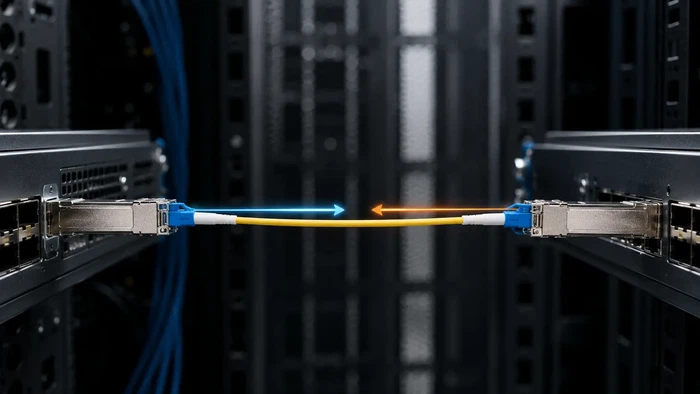
Single strand fiber, sometimes called single-fiber transmission or simplex fiber transmission, uses one optical fiber to carry traffic in both directions at the same time.
A traditional duplex fiber link uses two strands: one fiber transmits, the other receives. A single strand fiber link replaces that pair with one strand by separating the two directions in the wavelength domain instead of the spatial domain. With the right transceivers at each end, a full-duplex Ethernet link runs over a single physical fiber.
The classic published example is the 1000BASE-BX-D/U interface defined under IEEE 802.3ah: one end transmits at 1490 nm and receives at 1310 nm, while the opposite end transmits at 1310 nm and receives at 1490 nm. You can read the underlying physical layer requirements in the IEEE 802.3 Ethernet standard.
Single Strand Fiber vs Simplex Fiber vs Duplex Fiber
These three terms get mixed up constantly, especially in procurement tickets.
- Simplex fiber refers to a cable that physically contains one fiber strand, usually with a single LC, SC, or FC connector on each end.
- Duplex fiber refers to a cable that contains two fiber strands, normally terminated as a paired connector.
- Single strand fiber describes the transmission method: one strand carrying both directions, regardless of whether the underlying cable is technically a simplex patch cord or one strand of a larger trunk.
So a single strand fiber link almost always rides on a simplex patch cord, but the term "simplex" describes the cable, while "single strand fiber" describes the optical scheme.
How Single Strand Fiber Works
BiDi Transmission and WDM Inside the Module
Most single strand fiber Ethernet links use BiDi transmission. BiDi is short for bidirectional. Instead of separating the two directions by giving each its own fiber, BiDi optics separate them by wavelength using a small wavelength division multiplexing filter inside the transceiver. That filter, often called a diplexer, combines the outgoing laser and the incoming signal on a single shared port.
One typical pairing looks like this:
| End | TX wavelength | RX wavelength |
|---|---|---|
| A | 1310 nm | 1490 nm |
| B | 1490 nm | 1310 nm |
That is why a single strand fiber link cannot use two identical modules: the diplexers would both expect to transmit on the same color of light, and the link would never come up. A deeper breakdown of the diplexer and laser arrangement is covered in this BiDi transceiver technology explanation.
Common BiDi Wavelength Pairs
Different speeds and reaches use different wavelength pairs. The table below shows the combinations engineers most often encounter on enterprise and access networks.
| Speed | End A (TX/RX) | End B (TX/RX) | Typical reach |
|---|---|---|---|
| 1G BiDi SFP | 1310 / 1550 nm | 1550 / 1310 nm | 10–40 km |
| 1G BiDi SFP | 1310 / 1490 nm | 1490 / 1310 nm | 10 km (BX-D/U) |
| 10G BiDi SFP+ | 1270 / 1330 nm | 1330 / 1270 nm | 10–20 km |
| 10G BiDi SFP+ | 1490 / 1550 nm | 1550 / 1490 nm | 40 km |
| 25G BiDi SFP28 | 1270 / 1330 nm | 1330 / 1270 nm | 10 km |
Module makers do not all use the same labels. Some print "BX-U" and "BX-D" (upstream and downstream), others print "TX1310/RX1490" directly. Mixing labels across vendors is one of the easier mistakes to make in inventory, so it is worth standardizing the naming in your stockroom before ordering.

Single Strand Fiber vs Dual Strand Fiber
Both single strand and dual strand fiber will run reliable Ethernet links when designed properly. The right choice depends on what is scarce: fiber strands, time, money, or operations complexity.
| Item | Single Strand Fiber | Dual Strand Fiber |
|---|---|---|
| Fiber usage | One strand | Two strands |
| Typical optics | BiDi SFP / BiDi SFP+ / BiDi SFP28 | Standard duplex SFP / SFP+ |
| Connector | Simplex LC (usually) | Duplex LC |
| Module pairing | A/B pair, opposite TX/RX wavelengths | Same model both ends |
| Spare module stocking | Two SKUs (A and B) | One SKU |
| Main advantage | Saves fiber cores | Standardization, vendor availability |
| Main risk | Wavelength mismatch, receiver overload on short links | TX/RX polarity, fiber type mismatch |
| Best fit | Limited fiber count, existing cable plant, leased dark fiber, access links | New builds, dense data centers, lab environments |
Choose BiDi when fiber count is the constraint. Choose duplex when standardization, spare-parts availability, and operator simplicity matter more.

Single Strand Fiber Selection Checklist
Use this checklist as a decision table before placing an order. Each row represents the kind of situation that lands on a network engineer's desk, with the matching call.
| Situation | Recommended approach |
|---|---|
| One spare fiber strand, need 1G or 10G link | BiDi SFP / SFP+ matched pair |
| New data center cabinet build, plenty of strands | Standard duplex SFP+, structured cabling |
| Short single-mode link (under 1 km) with a 10 km / 40 km module | Check receiver overload, add fiber attenuator if needed |
| Unknown legacy fiber plant | Test insertion loss and reflectance before ordering optics |
| Multi-vendor switches at each end | Confirm transceiver coding on both ends before purchase |
| Outdoor cabinet or industrial site | Use industrial-temperature BiDi modules |
| Need DOM monitoring across the link | Confirm DOM/DDM support on both transceiver and switch |
| Leased dark fiber, only one strand available | BiDi pair with appropriate reach for the leased route |
When Single Strand Fiber Is the Right Choice
1. You Have Limited Existing Fiber Strands
The strongest case for single strand fiber is plain fiber scarcity. A building-to-building link may have one unused strand left in a 12-core riser, or a campus conduit may be too full to fish in another cable. With a matched BiDi pair, that one spare strand can carry a new full-duplex Ethernet link without civil work.
Common scenarios where this comes up:
- Enterprise campus links between buildings on aging risers
- Industrial sites with limited fiber in armored cable runs
- Municipal networks reusing existing duct space
- ISP access networks where each subscriber feeder is short on strands
- CCTV and security backbones added after the original install
- Wireless backhaul where roof-to-shelter fiber is fixed
2. Pulling New Fiber Is Too Expensive
Transceiver cost is rarely the dominant number on a project. Trenching, conduit access, building entry, splicing, OTDR testing, after-hours labor, and downtime usually dwarf it. If a BiDi pair removes the civil work, the project budget often lands lower even when the optics themselves cost more per port than standard duplex SFPs.
3. You Need to Improve Fiber Utilization on an Existing Plant
Single strand fiber does not magically widen the bandwidth of a single optical channel. What it changes is the number of physical strands per link. On an installed cable that already carries several services, freeing one strand per link can postpone a fiber augmentation project by years.
4. The Link Is a Simple Point-to-Point
BiDi optics shine on straightforward point-to-point connections: switch to switch, switch to media converter, router to access switch, remote cabinet to core, or building A to building B. A matched pair on a clean simplex fiber path is usually all it takes.
When You Should Not Use Single Strand Fiber
Single strand fiber is a tool, not a default. Reach for dual strand fiber instead when any of these are true:
- The site already has more than enough spare fiber pairs
- The operations team would rather stock one SKU of duplex SFPs than two SKUs of A/B BiDi modules
- A specific optical interface you need is only available in duplex form
- The project is a new high-density data center build with structured duplex cabling already designed
- You cannot confidently confirm wavelength pairing, optical budget, connector polish, and switch coding before deployment
- The fiber plant has high reflectance or unknown history, where adding A/B complexity will slow troubleshooting
In field deployments, the failure is rarely the fiber itself. It is almost always the wrong A/B module pair sitting on the wrong end, or a long-reach module pumping too much power into a short link.
How to Choose a Single Strand Fiber Solution
Step 1: Confirm the Fiber Type
Most single strand BiDi Ethernet links are designed for single-mode fiber, typically OS2 single-mode fiber in enterprise and carrier deployments. Do not assume the patch cord in your hand is the right type just because the connector fits the port.
What to verify before ordering:
- Fiber type: single-mode (OS2 most common) or multimode
- Connector type: LC, SC, FC, or other
- Polish: UPC or APC
- Patch panel and adapter type on each end
- End-to-end distance, including patch cord runs inside both rooms
- Number of splices and mated connectors in the path
Step 2: Choose the Speed and Form Factor
Match the transceiver to the switch port. The most common options are 1G BiDi SFP, 10G BiDi SFP+, and 25G BiDi SFP28; 40G and 100G single-fiber variants exist but are less standardized. A 10G SFP+ module will not negotiate at 1G in a port that does not explicitly support dual-rate operation, which is a frequent gotcha when reusing older access switches. A useful background read here is the practical difference between single-mode and multimode SFP modules when planning a mixed fleet.
Step 3: Match TX/RX Wavelengths
This is the step that breaks links most often. A BiDi pair needs complementary wavelengths at the two ends. Always read the label or datasheet for the actual TX and RX numbers rather than trusting a part number.
| Side A | Side B | Result |
|---|---|---|
| TX 1310 / RX 1490 | TX 1490 / RX 1310 | Correct pair |
| TX 1310 / RX 1490 | TX 1310 / RX 1490 | No link (same TX wavelength) |
| TX 1270 / RX 1330 | TX 1330 / RX 1270 | Correct pair |
| TX 1490 / RX 1550 | TX 1550 / RX 1490 | Correct pair if reach and power match |
Step 4: Check Distance and Optical Budget
The number printed on the cage ("10 km", "40 km") is a reach rating, not an instruction. What matters is the optical budget across your specific link. Pull each of these numbers before ordering:
- Transmit power (TX min / max)
- Receiver sensitivity
- Receiver overload threshold
- Fiber attenuation per kilometer
- Per-connector loss and number of mated pairs
- Splice loss and number of splices
- Safety margin (commonly 2–3 dB)
Two failure modes hide here. The first is too little power, the obvious one. The second, less obvious, is too much power: a 40 km module on a 500 m fiber can drive the receiver above its overload threshold and produce bit errors or no link at all. Short hops with long-reach optics often need a fixed inline attenuator. For a deeper look at where each decibel goes, see this overview of insertion loss in fiber networks.
Step 5: Confirm Connector and Device Compatibility
Before placing the order, verify:
- Switch, router, or media converter brand and exact model
- Port speed and dual-rate support
- Vendor coding requirements (some platforms reject uncoded optics)
- Connector type and the matching simplex LC connector on each patch cord
- Polish type (UPC vs APC) end to end
- DOM/DDM monitoring support on both the module and the host
- Operating temperature range, if the optic sits in a roadside cabinet or rooftop enclosure
DOM/DDM is worth turning on whenever the platform supports it. It exposes received optical power, TX power, temperature, and laser bias current, which together let you spot a degrading link weeks before it fails hard.
Common Single Strand Fiber Deployment Mistakes
Mistake 1: Plugging a Standard Duplex SFP Into One Fiber
A normal duplex SFP expects two fibers. Connecting only one will leave the link permanently down. Use a proper BiDi or single-fiber transceiver instead.
Mistake 2: Buying Two Identical BiDi Modules
BiDi optics are sold and stocked as A/B pairs. Two identical modules transmit on the same wavelength, and the link will not come up. Keep the A and B SKUs visibly separated in your inventory and label them on the rack.
Mistake 3: Ignoring the Optical Budget
A correct wavelength pair still fails if the received power is outside the receiver window. Measure or estimate loss before specifying long-reach optics, and never assume a freshly tested link will stay at its day-one loss after a few re-patches.
Mistake 4: Mixing APC and UPC Connectors
APC and UPC polishes are not interchangeable. Mating them produces a poor physical contact, high insertion loss, and sometimes serious back-reflection problems. The fiber plant either uses one or the other end to end. For a refresher on how the polish geometry interacts with reflectance, see this guide to SC/APC connectors and polish types.
Mistake 5: Forgetting Switch Compatibility
Some switches enforce strict transceiver coding and silently disable uncoded or third-party optics. Confirm compatibility with the exact firmware version before placing an order, especially on enterprise switches, OLTs, and ONUs.
Mistake 6: Stocking Spares Without an A/B Plan
A surprising number of after-hours outages come from spares that turn out to be the wrong half of the pair. Track A and B SKUs separately, label cabinets with which end uses which, and keep one of each on the truck.
How to Troubleshoot a Single Strand Fiber Link
When a BiDi link will not come up, walk this sequence rather than swapping parts at random:
- Read the printed TX/RX wavelengths on both modules. Confirm they are complementary, not identical.
- Read the DOM values on both ends. RX power of −40 dBm or "loss of signal" usually means a fiber, connector, or wavelength problem rather than a module problem.
- Clean both LC end faces with a known-good cassette cleaner and inspect with a scope. Most "broken" BiDi links are dirty end faces.
- Loopback test each module on a known-good fiber pair using an attenuator, to prove the optic itself is alive.
- If RX power is unusually high (for example, −2 dBm on a 40 km optic over 200 m of fiber), add an inline attenuator sized to bring the level into the receiver window.
- Verify connector polish (UPC vs APC) is consistent end to end. A single APC adapter slipped into a UPC chain will be quietly costly.
- If everything checks out optically but the port still does not come up, swap the transceiver coding (vendor-coded vs generic) to rule out switch-side rejection.

FAQ
Q: What is the difference between single strand fiber and duplex fiber?
A: Single strand fiber uses one fiber for both transmit and receive, separating directions by wavelength using BiDi optics. Duplex fiber uses two fibers, one per direction, with standard SFPs at each end.
Q: Is single strand fiber the same as simplex fiber?
A: Not exactly. Simplex describes the cable (one strand). Single strand fiber describes the transmission method (one strand carrying both directions). A single strand fiber link almost always uses a simplex patch cord, but the terms are not synonymous.
Q: Can I use a normal SFP with single strand fiber?
A: No. A standard duplex SFP needs two fibers to operate. To run on one strand you need a BiDi or single-fiber transceiver with a built-in wavelength filter.
Q: Do BiDi SFPs need to be used in pairs?
A: Yes. They are sold and deployed as complementary A/B pairs. The transmit wavelength at one end must match the receive wavelength at the other.
Q: What happens if I install two identical BiDi modules?
A: The link will not come up. Both modules will transmit on the same wavelength and listen on the same wavelength, so neither side hears the other.
Q: Is BiDi fiber reliable for enterprise networks?
A: Yes, when properly designed. BiDi optics have been deployed at carrier scale since 1000BASE-BX10 was standardized, and most outages traced to BiDi links turn out to be dirty connectors, wrong A/B pairing, or receiver overload on short hops, not the technology itself.
Q: Is single strand fiber single-mode or multimode?
A: The large majority of BiDi Ethernet links use single-mode fiber, usually OS2. Multimode BiDi variants exist for very short reach but are uncommon in mainstream enterprise networks.
Q: Is single strand fiber cheaper than dual strand fiber?
A: The optics cost more per port, but the total project cost can be lower when single strand fiber avoids new cable installation, additional patch panel ports, or extra leased strands. The break-even depends entirely on civil work cost.
Q: Can single strand fiber support 10G and 25G?
A: Yes. 10G BiDi SFP+ is now standard for single-fiber 10G links, and 25G BiDi SFP28 is widely available for 5G/4G fronthaul and access uplinks. Speed, wavelength pair, reach, and switch compatibility still need to match.
Q: Does single strand fiber reduce performance compared to duplex?
A: Not by itself. A correctly specified BiDi link runs full-duplex at line rate. Performance issues almost always trace back to wavelength mismatch, poor fiber condition, dirty connectors, incompatible coding, or an optical budget that lands outside the receiver window.
Final Take
Single strand fiber is one of the most useful tools available when fiber strands are scarce, civil work is expensive, or an existing cable plant needs to deliver more links without growing. It is not a default for new builds, and it punishes any team that orders by reach and speed alone.
A reliable deployment comes down to a short list of checks: the right fiber type, the right speed and form factor, a complementary TX/RX wavelength pair, an optical budget that lands inside the receiver window, consistent connector polish end to end, and a host that accepts the module. Run those checks once, document the A/B inventory, and the link will behave for years.
If you are planning a single strand fiber project, start with the link distance, the existing fiber type, the connector polish, the required speed, and the switch model. Pick the matched BiDi pair around those constraints rather than the other way around.