A wired connection that keeps dropping, negotiates at 100 Mbps instead of Gigabit, or refuses to link at all usually points to one thing first: the cable. Before swapping switches or reinstalling drivers, a proper Ethernet cable test can confirm whether the problem is a damaged conductor, a bad crimp, incorrect pin order, or a subtler performance issue like a split pair.
This guide walks through how to test an Ethernet cable with a cable tester, how to read and interpret common test results, what you can do without a tester, and when a basic wiremap check is not enough.
What Does an Ethernet Cable Test Actually Check?
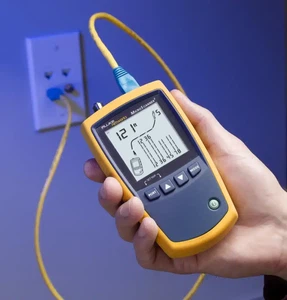
A basic Ethernet cable test answers one core question: are all eight conductors connected correctly from one end to the other? In technical terms, the tester checks continuity and wire order - what the industry calls a wiremap. Most entry-level testers use a main unit and a remote unit, send signals through each conductor in sequence, and report whether each wire is connected, open, shorted, or landed on the wrong pin.
That tells you the cable is wired correctly. It does not tell you the cable can reliably carry Gigabit Ethernet or support Power over Ethernet under load. A wiremap pass does not validate pair integrity, crosstalk performance, or attenuation characteristics at higher frequencies. This distinction matters because a cable can light up green on a basic tester and still cause intermittent drops or force a link down to a lower speed in production.
According to Fluke Networks' testing hierarchy, cable test instruments fall into three levels: verification (wiremap and continuity), qualification (bandwidth capability assessment), and certification (full compliance testing against TIA or ISO standards). Knowing which level your situation requires helps you avoid both over-testing and under-testing.
When Should You Test an Ethernet Cable?
You do not need to test every cable in your rack, but certain symptoms should trigger a check right away.
Intermittent connection drops
If the link comes and goes - especially when the cable is moved or the ambient temperature changes - suspect internal damage, a loose termination, or a connector with bent contacts. This is one of the most common cable-related failure modes, and a simple continuity test can often catch it immediately.
Speed negotiation problems
A Gigabit port that consistently negotiates at 100 Mbps is a classic sign of a wiring fault. 1000BASE-T requires all four pairs to function correctly. If even one pair has an open, a short, or a split-pair condition, the link may still come up - but only at Fast Ethernet speed. This is a scenario where many users blame the switch or NIC first, when the cable is actually the cause.
Newly crimped or newly installed cables
Any freshly terminated cable should be tested before it goes into service. This is the easiest way to catch an incorrect pin order, a conductor that did not seat into the RJ45 plug, or a connector that was crimped with insufficient pressure.
Suspected physical damage
Bent pins, broken latch clips, crushed jacket sections, or a cable that was pulled around a tight corner - all of these justify testing before you start troubleshooting the switch port or endpoint device. Visual inspection is always the first step, but a tester confirms what you cannot see inside the jacket.
Tools for Testing Ethernet Cables
Basic cable testers (verification level)
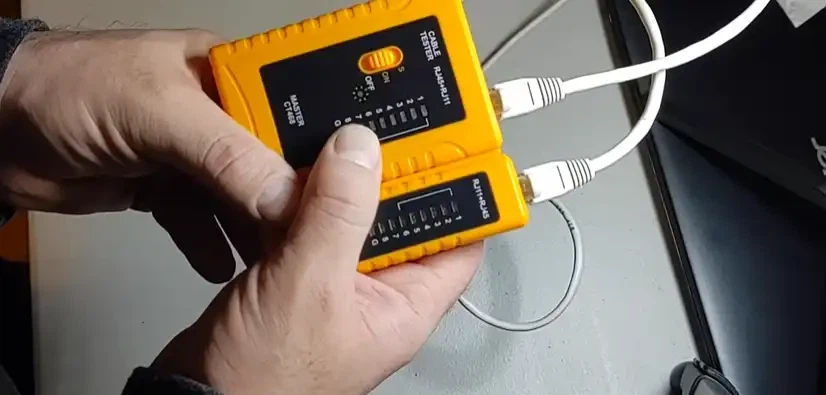
A basic network cable tester - sometimes called a wiremap tester - is sufficient for most day-to-day checks. It includes a main unit and a remote unit. You connect one end of the cable to each, press test, and read the wire sequence. These tools detect opens, shorts, miswires, crossed pairs, and reversed pairs. Better models, like the Fluke Networks MicroScanner, also include a TDR (Time Domain Reflectometer) to measure cable length and estimate distance to a fault.
Advanced testers (qualification and certification level)
Qualification testers go further by assessing whether a cable can support specific network speeds - 100BASE-TX, VoIP, or Gigabit Ethernet. Certification testers like the Fluke Networks DSX CableAnalyzer measure parameters defined in the ANSI/TIA-568 and ISO 11801 standards, including insertion loss, return loss, NEXT (near-end crosstalk), and PSNEXT. These are the tools used when professional installation work requires documented proof that every link meets a specific performance category.
No tester available
Even without dedicated equipment, you can still narrow the problem. Plug the suspect cable into a known-good switch port and a known-good device, then check the link LED. If the LED does not light or blink, the cable is likely faulty. Compare with a different cable on the same port. If the replacement cable works, you have strong evidence. Also inspect the cable closely for kinks, sharp bends, crushed sections, and damaged RJ45 plugs. This is not a substitute for a real tester, but it is an effective first filter.
How to Test an Ethernet Cable with a Cable Tester
Step 1: Visually inspect the cable and connectors
Before plugging anything in, look at the cable and both connectors. Check for cuts, crushed or flattened sections, sharp bends (especially near the plug), frayed outer jacket, broken or missing latch clips, and bent or recessed gold contacts on the RJ45 plug. If the cable has been run through a wall or ceiling, inspect the visible portions and the termination points at each end. Physical damage is the single most common cause of cable failures, and catching it here saves time on every step that follows.
Step 2: Connect the main unit and remote unit
Plug one end of the Ethernet cable into the tester's main unit and the other end into the remote. If you are testing an installed run that terminates at wall jacks or a patch panel, use known-good patch cords to connect the tester to the jacks. This prevents a bad patch lead from producing misleading results on the permanent link.
Step 3: Run the test
Power on the tester and start the test. Some models begin automatically when they detect a cable; others require a button press. The tester cycles through each conductor, sending a signal and checking whether it arrives at the correct position on the remote unit. Basic testers display the sequence using numbered LEDs. More advanced models show a graphical wiremap on screen, along with additional information like pair lengths and detected faults.
Step 4: Read the wire sequence
On a correctly wired straight-through cable, indicator 1 on the main unit should correspond to indicator 1 on the remote, indicator 2 to 2, and so on through all eight conductors. If a different indicator lights, or no indicator lights for a given position, there is a wiring fault. A basic tester will show you what is wrong - open, short, miswire, or crossed pair - but it will not tell you whether the cable can actually sustain Gigabit performance.
Both ends of the cable must follow the same wiring standard. The two recognized pinout schemes are T568A and T568B, as defined in the ANSI/TIA-568 standard. Either scheme works, but mixing them on the same cable creates a crossover configuration - which is not what you want for a standard network connection.
Step 5: Retest after any re-termination
If the cable fails, re-terminate the suspect connector and test again. If internal conductors appear damaged, replace the cable. For field installations, it is good practice to test twice: once immediately after termination, and again after the cable has been routed, bundled, and secured in its final position. Handling during installation can introduce faults that were not present at the workbench.
What Do Ethernet Cable Tester Results Mean?
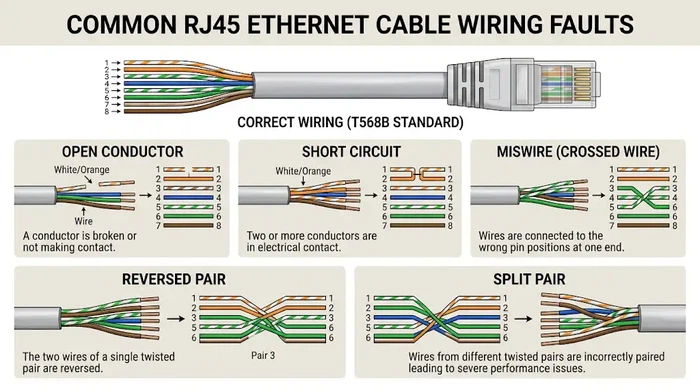
Open
An open means one or more conductors are not making a complete connection end to end. The most common causes are a conductor that did not fully seat into the RJ45 plug during crimping, a break somewhere inside the cable jacket, or physical damage at a bend point. On a basic tester, you will see a missing LED for the affected conductor.
What to do: Recheck the termination. If the connector looks good, inspect the cable for damage. Re-terminate or replace as needed.
Short
A short means two conductors are electrically touching each other when they should not be. This can happen at the connector if too much jacket was stripped and bare wires are making contact, or internally if the cable was crushed or pinched.
What to do: If the short is near the plug, cut it off and re-terminate with a fresh connector. If the short is internal, replace the cable.
Miswire or reversed pair
This result means the conductors are landed on the wrong pins. On a basic tester, the LED sequence will be out of order - for example, position 3 on the main unit lighting up position 6 on the remote. This usually happens when the wires were placed in the wrong order during termination, or when one end follows T568A and the other follows T568B.
What to do: Cut off the faulty connector, re-strip and re-order the wires carefully, and re-crimp using the same wiring standard on both ends.
Split pair
A split pair is one of the trickiest faults because many basic testers cannot detect it. In a split pair, the pin-to-pin continuity is correct - each pin connects to the right pin at the far end - but the physical pairing of conductors is wrong. Instead of the transmit signal traveling on a proper twisted pair, it travels on wires from two different pairs. The result is dramatically increased crosstalk, which may not matter at 10 or 100 Mbps but will often cause failures at Gigabit speed.
What to do: If you suspect a split pair (the cable passes wiremap but fails at Gigabit or shows excessive errors), use a tester capable of detecting split pairs, or replace the cable with a properly terminated one.
Pass - but the network still has problems
A wiremap pass does not rule out every possible cable issue. The cable could still be too long, poorly shielded, running too close to an EMI source, or simply low-quality material that cannot sustain the frequencies required for higher-speed Ethernet. The standard maximum channel length for twisted-pair Ethernet (10BASE-T through 10GBASE-T) is 100 meters, as defined by the IEEE 802.3 standard. Exceeding this limit increases attenuation and error rates, even if the wiremap is perfect.
What to do: Swap in a known-good cable of appropriate category. Check cable length if possible. Verify that the cable is not routed alongside power cables or fluorescent lighting ballasts. If problems persist, advanced qualification or certification testing may be needed.
How to Test an Ethernet Cable Without a Tester
If you do not have a cable tester, you can still perform several useful checks to isolate a faulty cable.
Check the link LED. Plug the suspect cable into a known-good port on a switch or router and connect the other end to a known-good device. Watch the link indicator LED on both the switch and the device. If the LED does not light up or shows no activity, the cable is the most likely culprit. This test takes seconds and eliminates a large percentage of completely dead cables.
Swap and compare. Replace the suspect cable with one you know works. If the problem disappears, the original cable was the issue. If the problem persists, move on to testing the port, the device, or the network configuration. This is the single most effective no-tool troubleshooting step for Ethernet cables and patch cables alike.
Inspect for physical damage. Look closely at the entire cable length if accessible. Check for sharp bends (especially at the plug), kinks, crushed jacket sections, and any signs of wear or rodent damage. A cable does not need to be visibly severed to fail - a sharp 90-degree bend at the connector, a chair wheel sitting on the cable, or a staple driven through the jacket can all cause intermittent issues.
Common Mistakes When Testing Ethernet Cables
Assuming a wiremap pass means full performance
This is the most frequent misunderstanding. Continuity proves a basic electrical path exists. It does not prove the cable can sustain Gigabit speeds, handle PoE delivery, or meet the crosstalk and attenuation limits defined in cabling standards. If you need performance assurance - not just connectivity - you need a qualification or certification tester.
Blaming the installed link when the patch cable is bad
If you use a cheap or damaged patch lead to test a wall jack or structured cabling run, you may incorrectly blame the permanent link. Always use known-good, tested patch cords during verification. The difference between a patch cable and a permanent link matters when diagnosing issues.
Ignoring physical conditions
A cable routed alongside high-voltage power lines, bundled too tightly with dozens of other cables, or draped over a fluorescent light fixture can show perfect wiremap results and still suffer from electromagnetic interference. Cable routing and environment matter as much as termination quality.
Testing once and assuming it is permanent
A cable that tests fine on the bench can develop faults during installation - from pulling tension, sharp bends around corners, or staple/nail damage. Test again after final routing and securing.
When a Basic Cable Tester Is Not Enough
A simple wiremap tester handles the majority of home, small office, and day-to-day patch cable checks. But there are situations where you need more.
Long cable runs. If a run approaches or exceeds the 100-meter maximum defined by IEEE 802.3 for twisted-pair Ethernet, you need a tester that can measure actual cable length and estimate distance to a fault. Guessing is not an option on runs buried in walls or ceilings.
PoE troubleshooting. A device that powers on inconsistently or fails to negotiate the correct PoE class may have a cable issue that does not show up on a wiremap test. PoE relies on all four pairs in many configurations, and even minor resistance issues can affect power delivery. For an overview of how higher-speed copper connections interact with cabling quality, see this guide on 10GBase-T and copper Ethernet performance.
Speed negotiation failures. If a port that should link at 1 Gbps consistently drops to 100 Mbps, the cable may have a split pair, excessive crosstalk, or attenuation that a basic tester cannot measure. A qualification tester can confirm whether the cable supports the target application speed.
Professional installation and handover. Structured cabling contractors are typically required to certify every link against TIA or ISO standards before handing over a completed installation. This requires a certification-level tester and produces documented test reports - wiremap alone is not sufficient for warranty or acceptance purposes.
Fault Symptom Reference
The following table maps common symptoms to their likely cable-related causes and recommended next steps.
| Symptom | Likely Cable Cause | Recommended Action |
|---|---|---|
| No link LED on switch or device | Open conductor, damaged plug, or cable break | Test wiremap; re-terminate or replace cable |
| Link drops when cable is moved | Intermittent open near connector or at a bend point | Re-terminate connector; inspect cable for damage |
| Gigabit port negotiates at 100 Mbps | Split pair, open on one pair, or miswire | Test wiremap; check for split pair; replace cable if needed |
| High packet loss or slow transfers | Crosstalk, excessive length, or EMI | Check cable length and routing; use qualification tester |
| PoE device powers on intermittently | Resistance issue on power-carrying pairs | Test all four pairs; check cable category and length |
| Cable passes tester but network is unstable | Cable quality, interference, or excessive length | Swap with known-good cable; consider advanced testing |
Frequently Asked Questions
Can a basic cable tester detect a split pair?
Not always. Many inexpensive testers only check pin-to-pin continuity, which a split pair will pass. You need a tester that specifically checks pair integrity - typically a qualification-level or better instrument. If you suspect a split pair (the cable passes wiremap but fails at Gigabit), the safest fix is to re-terminate both ends carefully, following the correct T568A or T568B color code.
Why does my Ethernet cable pass the test but still run slowly?
A wiremap pass only confirms basic connectivity and correct pin order. It does not measure crosstalk, attenuation, return loss, or cable length - all of which affect real-world performance. The cable may also exceed the 100-meter maximum, run alongside interference sources, or simply be a lower category than your application requires. For example, running 10GBASE-T over Cat5e cable will not work reliably, even if the wiremap is perfect.
Do I need to test both ends of an installed cable?
Yes. The tester's main unit goes on one end, and the remote unit goes on the other. This is the only way to verify end-to-end continuity and correct wire order. If you are testing an installed run through wall jacks, connect using known-good patch cords so the test results reflect the permanent link, not the patch cables.
What is the maximum length an Ethernet cable can be?
The IEEE 802.3 standard specifies a maximum channel length of 100 meters (328 feet) for twisted-pair Ethernet from 10BASE-T through 10GBASE-T. This includes the horizontal cable plus any patch cords at both ends. Exceeding this distance results in signal degradation, increased bit errors, and potential link failure. For longer distances, fiber optic connections or active extender devices are required. Learn more about how fiber optic cable installation can solve long-distance connectivity challenges.
Should I use T568A or T568B wiring?
Either standard works. The ANSI/TIA-568 standard recognizes both, and performance is identical as long as both ends of the cable follow the same scheme. T568B is more common in commercial installations; T568A is sometimes specified for government contracts and residential work. The important rule is consistency: pick one and use it everywhere. Mixing them on the same cable creates a crossover, which will cause problems on standard network connections.
Can I test Ethernet cables with a multimeter?
A multimeter can verify basic continuity on individual conductors - whether a wire is connected end to end and whether there is a short between conductors. However, it cannot check wire order, detect split pairs, measure cable length, or assess performance. A dedicated cable tester is far more practical for Ethernet work and costs as little as $20 for a basic model.
Conclusion
Testing an Ethernet cable is straightforward, but doing it properly means understanding what each level of testing can and cannot tell you. Start with a visual inspection. Use a cable tester to verify wiremap and continuity. If the cable fails, re-terminate or replace. If it passes but the network still misbehaves, consider cable quality, routing, length, and whether a more advanced tester is needed.
For most home and small-office users, the right approach is simple: inspect the cable, test with a basic tester, compare with a known-good cable, and only then move to switch or device troubleshooting. For professional installations, qualification or certification testing gives you the confidence - and the documentation - to know the cabling meets the requirements of the application it needs to support.