The main difference between SFP and SFP+ is speed-SFP supports 1G, while SFP+ supports 10G. But the real challenge lies in understanding port compatibility rules and correctly matching optical modules with fiber infrastructure.
What is SFP
SFP stands for Small Form-factor Pluggable. It became popular around 2000, primarily to replace the larger GBIC modules of that era.
Its greatest advantages are hot-swappable capability and compact size. You can insert and remove modules while the device remains powered on, which is a huge advantage for data center operations.
SFP speed ranges include:
- 100BASE-FX (100Mbps, rarely seen nowadays)
- 1000BASE-SX (multimode short-range, most common)
- 1000BASE-LX (single-mode long-range)
- 1000BASE-T (copper port, SFP also has RJ45 copper versions)
Taking the most commonly used 1000BASE-SX as an example, according to IEEE 802.3z standard, it can run 550 meters on OM2 multimode fiber and up to 1 kilometer on OM3. However, in actual projects, if your patch cords and patch panels vary in quality, you might experience packet loss beyond 300 meters.
DIMI Real-World Case
I previously worked on a campus network project where the distance between buildings was approximately 400 meters, using OM2 fiber. Theoretically, 1000BASE-SX should work fine, but during testing we found high error rates on some links. After investigation, we discovered that the couplers used in the intermediate patch panels were of poor quality, with excessive insertion loss. The problem was only resolved after replacing them with OM3 couplers.
Lesson learned: Don't push transmission distances to the upper limit of standard values-leave at least 20-30% margin.
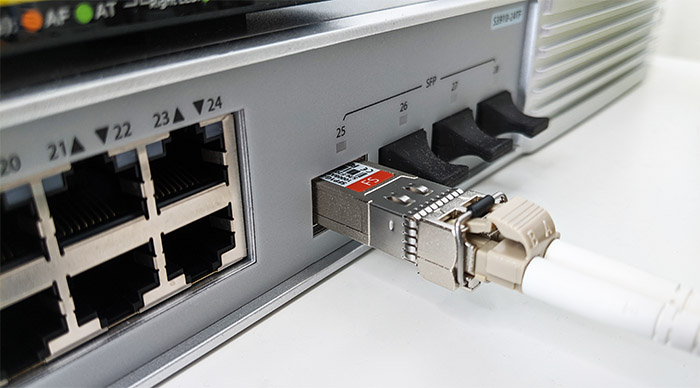
What is SFP+
SFP+ (Enhanced Small Form-factor Pluggable) is an enhanced version supporting up to 10 Gbps (up to 16 Gbps in Fiber Channel scenarios). It's used in data centers, server uplinks, storage networks, video streaming backbones, and other scenarios requiring high bandwidth. It maintains the same form factor as SFP (56.5mm × 13.5mm × 8.5mm) while increasing speed to 10 Gbps SFP+. It follows the SFF-8431 specification.
Common SFP+ Types:
- 10GBASE-SR: Multimode short-range, 300 meters on OM3, 400 meters on OM4
- 10GBASE-LR: Single-mode long-range, nominally 10 kilometers on OS2 fiber
- 10GBASE-ER: Single-mode extra long-range, 40 kilometers
- 10GBASE-T: Copper solution, up to 100 meters with Cat 6A cabling
10GBASE-SR performance varies significantly across different fiber grades. If you use older OM1/OM2 fiber, theoretical distances are only 33 meters and 82 meters respectively. In actual deployment, the fiber is so old that it can't run at full speed.
Compatibility
Many online articles will tell you "SFP+ vs SFP-SFP+ ports can use SFP modules," but this statement is only half correct. Whether it works depends on three factors:
Does the Port Support Multi-Rate (Dual-Rate)?
Most modern switches' SFP+ ports do support 1G downgrade, but not all of them. For example, some early pure 10G core switches had hardware that only supported 10G speeds-inserting a 1G module wouldn't be recognized at all.
Cisco's Nexus series and Catalyst 9300 series SFP+ ports generally support backward compatibility. However, some of Huawei's high-end devices (such as early versions of the CE12800) require manual forced downgrade using commands:
interface 10GE1/0/1speed 1000
Without this configuration, even if you insert a 1G module, the port status will remain down.
Do Protocols and Wavelengths Match?
For instance, taking a 10GBASE-LR single-mode module (1310nm wavelength) and downgrading it to run 1000BASE-LX (also 1310nm) should theoretically work fine. But if you try to connect a 10GBASE-ER (1550nm) to a 1000BASE-SX (850nm) device, they won't match at all.
Vendor-Specific Restrictions
Many vendors burn identification codes into modules, which devices will check. Cisco, Huawei, and H3C all have such mechanisms. If you buy third-party compatible modules, you may need to inform the supplier in advance "which device it will be used on" so they can burn the correct code.
No Reverse Compatibility
Inserting an SFP module into an SFP+ port is possible. But inserting an SFP+ module into an SFP port won't work.
Older SFP ports' PHY chips only support up to 1.25 Gbps (corresponding to Gigabit Ethernet), and the physical layer doesn't support 10G signals. Even if you force it in, the device won't recognize it or will simply report an error.

Power Consumption and Heat Dissipation
SFP modules typically consume between 0.5-1W. For example, the Cisco GLC-SX-MMD (1000BASE-SX) has a typical power consumption of 0.8W.
SFP+, due to higher speeds, generally consumes 1-1.5W. Cisco's SFP-10G-SR is around 1.3W, while 10GBASE-LR is even higher at 1.5W.
Here's an example: A 48-port SFP+ switch, if all ports are fully populated with 10G modules, would consume 48×1.3W = 62.4W just for the optical modules. This doesn't include the power consumption of the switching chip, fans, and other device components.
More critically, there's heat dissipation. 10G modules generate significant heat. If cabinet ventilation is poor and module temperature rises above 70°C, it may trigger overtemperature protection, automatically bringing the link down. So when deploying high-density 10G ports, you must:
Ensure adequate front and rear cabinet ventilation clearance (at least 15cm front, 20cm rear)
Check fan operation status
If possible, install cabinet top exhaust fans
Transmission Speed
SFP modules support data transmission rates up to 1 Gbps, perfectly suited for standard office networks or applications with moderate speed requirements. SFP+ modules, on the other hand, provide transmission rates up to 10 Gbps, making them ideal for high-speed applications such as video streaming, data backup, and large file transfers.
SFP can effectively manage basic network tasks, while SFP+ ensures smooth operation of data-intensive applications. This distinction is especially important for enterprises looking to future-proof their network expansion.
However, single-mode fiber also has a point to note for long-distance transmission: dispersion compensation. Links exceeding 40 kilometers (such as 10GBASE-ER/ZR) may require adding DCF (Dispersion Compensation Fiber) or adjusting the module's dispersion parameters.
Practical Application Scenario Comparison
SFP
Access layer switches: Office buildings, campus network floor access-1G bandwidth is sufficient and cost-effective
Surveillance systems: Camera access, NVR cascading-1G is adequate for 4K video streams
Industrial control networks: Factory floor PLCs, robot communications-stability is more important than bandwidth
Legacy device expansion: Some devices from 10 years ago only have SFP ports
SFP+
Data centers: Server uplinks, storage networks, virtualization clusters-10G is the baseline configuration
Core switching: Enterprise network core layer, aggregation layer uplinks-high traffic volumes
HD video production: 4K/8K non-linear editing systems, IP switchers-massive bandwidth demands
5G transport networks: Base station backhaul-a single 5G base station can have peak traffic up to 10Gbps
Tips: More and more data centers are now deploying 25G SFP28, even 100G QSFP28. 10G SFP+ is gradually shifting from "core" to "edge." However, for most small and medium enterprises, 10G remains the most cost-effective choice.
FAQ
My third-party module isn't being recognized by the device-what should I do?
Confirm three things:
Does the module model match (SR to SR, LR to LR)?
Are the wavelength and protocol compatible?
Does it need the device manufacturer's identification code burned in?
Why does the link work intermittently?
90% of the time, it's a fiber or patch cord issue:
Clean the end faces: Use a specialized cleaning pen, not alcohol swabs
Check bending: Fiber bend radius cannot be less than 30mm
Measure optical power: Run an OTDR test to see which segment has abnormal attenuation
If you've ruled out fiber issues, check module temperature, device fans, or even the data center ambient temperature.
Can SFP+ downgrade to 100M?
Theoretically yes, but very few devices support it. Most SFP+ ports only support dual-rate 10G and 1G, not 100M. If you truly have 100M requirements, it's recommended to use a dedicated SFP port or copper port.
How long do optical modules last?
This varies greatly. High-quality original modules can work for 5-7 years without issues. We've seen Huawei SFP modules installed in 2012 that are still running today. But for third-party modules, it's uncertain.