The number of fiber cores you need depends on three things: what optics your equipment uses, how many active links you need to support, and how much room you want for future growth. A standard duplex Ethernet link uses two fibers - one to transmit, one to receive. But not every link is duplex. Some bidirectional transceivers operate over a single strand, and parallel-optics interfaces such as MPO/MTP-based modules can require eight, twelve, or more fibers per connection. So the right starting point is always the transceiver and connector, not the cable.
This guide walks through a repeatable method for calculating the fiber count you actually need - whether you are wiring a small office, a building backbone, or a data center interconnect.
What Does Fiber Core Count Mean?
Fiber core count is the total number of individual optical fibers bundled inside a single cable jacket. A 2-core cable holds two fibers. A 12-core cable holds twelve. A 48-core cable holds forty-eight. The number tells you how many independent optical paths the cable provides.
This is not the same as fiber core size. Core size - measured in micrometers - refers to the diameter of each fiber's light-carrying center. Singlemode fiber has a smaller core (around 9 µm), while multimode fiber uses a larger core (50 µm or 62.5 µm). Choosing between singlemode and multimode is a separate decision from choosing how many fibers go in the cable.
Simplex, Duplex, and Multifiber: Why It Matters
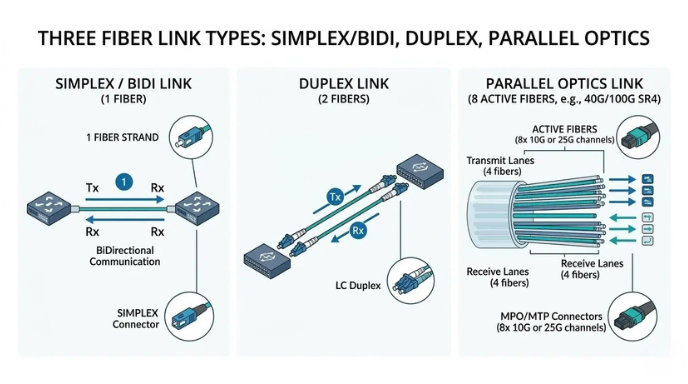
Before you count anything, you need to know what type of link you are building:
- Duplex links use two fibers - one for transmit (Tx) and one for receive (Rx). This is the standard configuration for most 1G and 10G Ethernet connections using LC connectors or SC connectors.
- Simplex or bidirectional (BiDi) links carry both transmit and receive traffic over a single fiber using wavelength-division multiplexing within a BiDi transceiver. This cuts the strand count in half but requires compatible optics on both ends.
- Parallel-optics links use multiple fibers simultaneously. For example, the IEEE 802.3ba standard defines 40GBASE-SR4, which transmits over four fibers and receives over four fibers - eight active fibers total - through an MPO/MTP connector. The 100GBASE-SR4 standard (defined in IEEE 802.3bm-2015) also uses eight active fibers over an MPO-12 interface.
If you assume every link needs exactly two fibers, you will undercount for parallel-optics environments and overcount for BiDi deployments. Always verify the transceiver datasheet first.
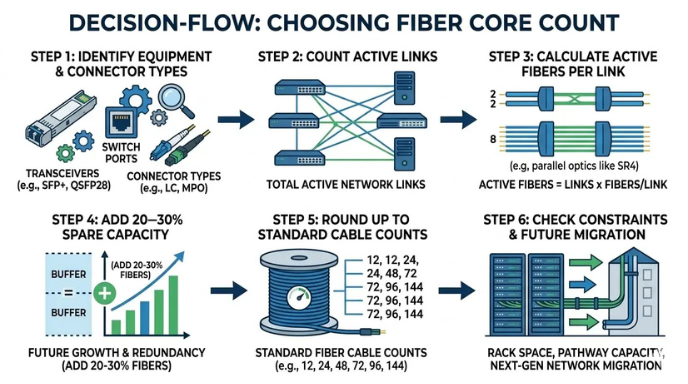
How to Determine Your Fiber Count: Step by Step
Step 1: Identify the transceiver and connector type
Check the equipment documentation for every port you plan to connect. A 1G SFP with an LC duplex interface needs two fibers per link. A 40G QSFP+ with an SR4 optic needs eight fibers per link through an MPO connector. A BiDi SFP needs only one. Document each link type before moving to the next step.
Step 2: Count active fiber links
List every point-to-point connection in your design - not just the number of devices. A switch with 24 ports does not automatically require 48 fibers. Some ports may be copper, some may be unused, and uplinks often have different optics than access ports. Count actual planned connections and their fiber requirements individually.
For example: ten duplex LC links (20 fibers) plus two 40G SR4 uplinks (16 fibers) equals 36 active fibers - a total you would miss if you only counted twelve devices and multiplied by two.
Step 3: Add spare fibers
Building a cable plant with zero spare capacity is risky. Fibers can be damaged during installation or future maintenance. The Fiber Optic Association (FOA) recommends including extra fibers when specifying cable to account for installation damage and future additions. The FOA's network design guidance specifically notes that purchasing cable with a few extra fibers allows for damage at splice or termination points without causing major rework.
A common practical target is to keep initial utilization at or below 70–80% of the cable's total strand count, leaving 20–30% for growth, re-routing, or repair.
Step 4: Round up to a standard cable count
Fiber cables are manufactured in standard strand counts - typically 2, 4, 6, 8, 12, 24, 48, 72, 96, and 144. Loose-tube cables are commonly built around 12-fiber tube groupings, and ribbon cables are typically organized in 12-fiber ribbons. MPO/MTP connectivity is designed around 8-fiber and 12-fiber interfaces, making multiples of 12 particularly practical for structured cabling.
Once you know your active fiber count plus spares, round up to the next standard count that your termination hardware and distribution panels can support. Choosing a non-standard count often leads to sourcing delays and termination complications.
Step 5: Factor in pathway constraints and future migration
A cable count that is technically sufficient can still be a poor long-term choice. Consider whether the conduit or pathway will be opened again - if installation labor is already scheduled and the pathway has room, stepping up to the next standard count is often more cost-effective than pulling a second cable later.
Also consider migration scenarios. If your current design uses duplex 10G links but a future upgrade to 40G or 100G parallel optics is likely, choosing a 12-fiber or 24-fiber cable now can avoid recabling when the time comes. The structured cabling standards from ANSI/TIA-568 are designed to provide a commercial cabling lifespan of at least ten years, so planning ahead is part of the standard's intent.
Fiber Count Quick-Reference Table
| Link Type | Typical Optics / Connector | Active Fibers per Link | Common Cable Count |
|---|---|---|---|
| Standard duplex Ethernet (1G/10G/25G) | SFP/SFP+ with LC duplex | 2 | 2-core patch cord; 12- or 24-core for backbone runs |
| Bidirectional (BiDi) link | BiDi SFP/SFP+ with LC simplex | 1 | 2-core (with spare); simplex patch cord for short runs |
| 40GBASE-SR4 | QSFP+ with MPO-12 | 8 (4 Tx + 4 Rx) | 12-core (leaves 4 spare within the MPO-12 footprint) |
| 100GBASE-SR4 | QSFP28 with MPO-12 | 8 (4 Tx + 4 Rx) | 12-core |
| 100GBASE-SR10 | CFP with MPO-24 | 20 (10 Tx + 10 Rx) | 24-core |
| 400GBASE-SR8 | OSFP/QSFP-DD with MPO-16 | 16 (8 Tx + 8 Rx) | 24-core (with spare capacity) |
| Breakout (e.g., 40G to 4×10G) | MPO-to-LC breakout cable | 8 | 12-core trunk; breakout at patch panel |
Common Fiber Counts and Where They Fit
2-core and 4-core
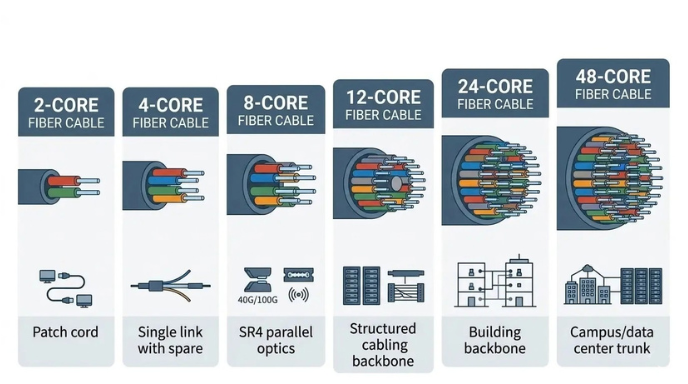
These low counts work for individual point-to-point patch cords and simple device connections. A 2-core fiber patch cord is the standard for connecting a single duplex port to a patch panel or another device. A 4-core cable provides a duplex link with two spare strands, or supports two independent simplex connections.
These counts make sense when the cable serves a single link and does not share a pathway with other infrastructure.
6-core and 8-core
A 6-core cable can handle three duplex links or provide spare capacity for one or two links with room for a future add. An 8-core cable aligns directly with the 8-fiber footprint of 40GBASE-SR4 and 100GBASE-SR4 parallel optics, making it practical for short runs that serve a single high-speed connection without using a full 12-core trunk.
In practice, 8-core cables see frequent use in MPO environments where the cable serves exactly one parallel-optics link.
12-core
The 12-fiber grouping is a fundamental building block in fiber cabling infrastructure. Loose-tube cables group fibers into tubes of 12. Ribbon cables use 12-fiber ribbons. MPO-12 connectors are the standard interface for 40G and 100G parallel optics. Choosing 12-core means your cable aligns with virtually every major connectivity ecosystem, from patch panels to trunk assemblies.
For a small structured cabling backbone - for example, connecting a telecom room to a floor distribution point with five or six duplex links - 12-core gives you working capacity plus meaningful room for adds and changes.
24-core
A 24-core cable doubles the capacity of a 12-core while staying within the same manufacturing and termination standards. This count is a common choice for building backbones, inter-floor links, and scenarios where the pathway supports only one cable pull but needs to serve multiple link types over its lifetime.
Twenty-four strands can support up to twelve duplex connections, three 40G/100G SR4 links, or various combinations of duplex and parallel-optics ports - with spare capacity in each case.
48-core, 72-core, 96-core, and beyond
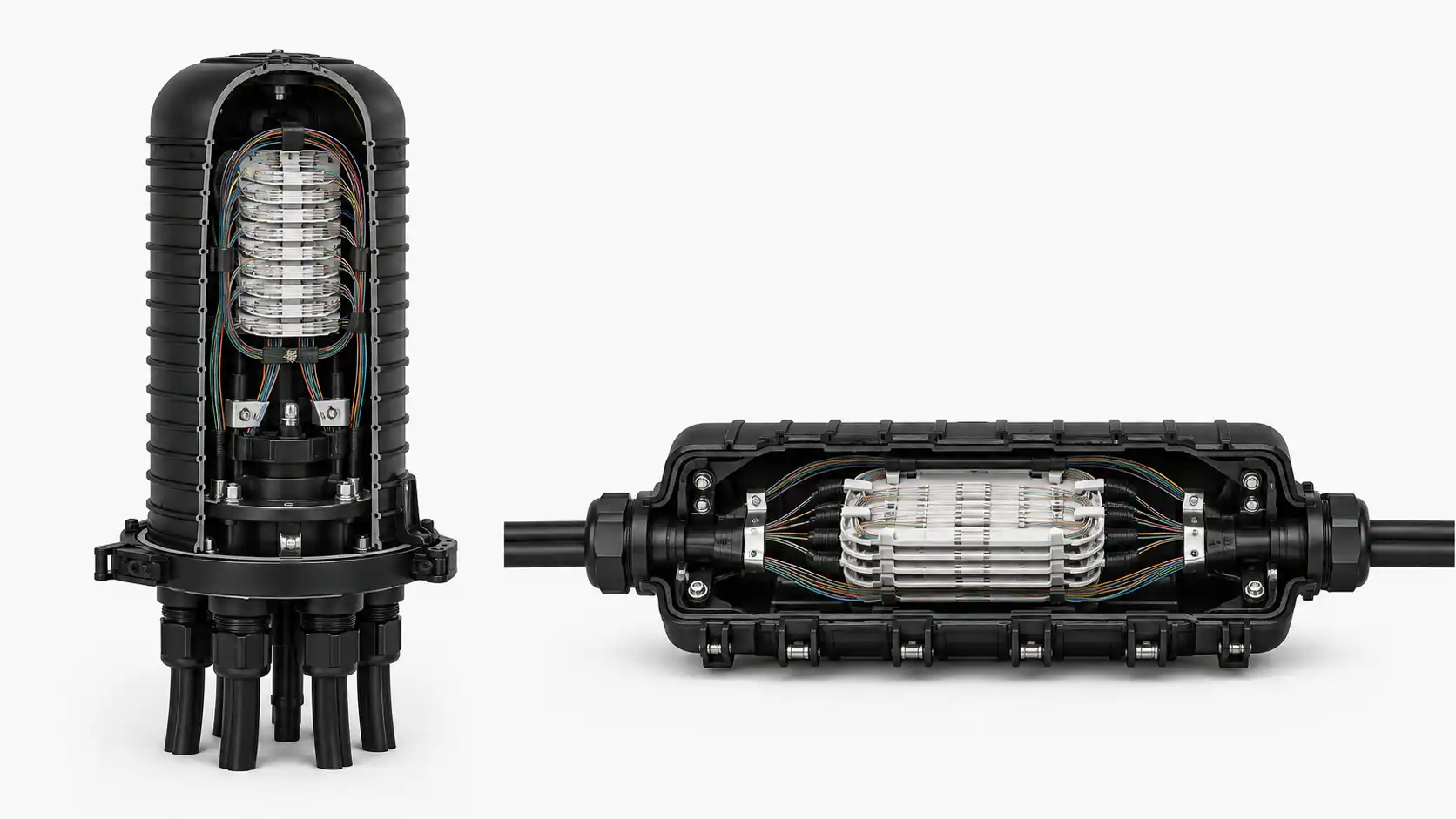
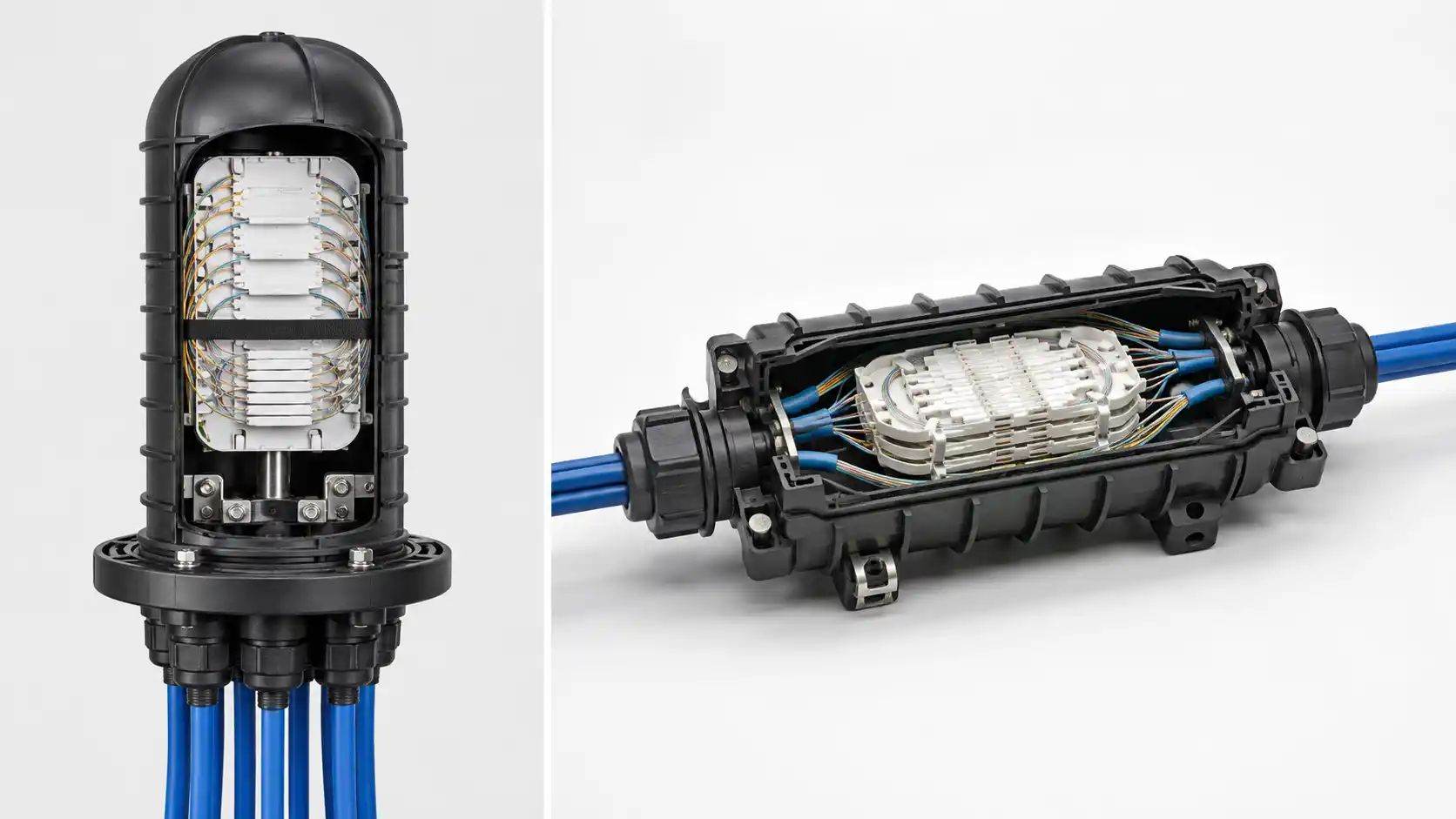
Higher counts serve shared pathways, building-to-building backbones, data center row-to-row trunking, and campus distribution. At these counts, the cable itself becomes a shared infrastructure asset rather than a connection to a specific device. Planning at this scale typically involves coordination with splice closures, high-density patch panels, and MPO trunk cable systems designed for staged deployment.
These higher-count cables make economic sense when the installation labor and pathway construction costs outweigh the incremental material cost of additional fibers.
Worked Examples
Example 1: Small enterprise floor with 10 duplex links
A company needs to connect a telecom room to ten office-area access points, all using 1G SFP transceivers with LC duplex connectors.
- Active fibers: 10 links × 2 fibers = 20 fibers
- Spare target (roughly 20%): 4–5 additional fibers
- Total need: approximately 24–25 fibers
- Recommended cable: 24-core
Choosing a 24-core cable covers all active links with a small buffer for future additions. Choosing exactly 20 fibers would leave zero margin and is not available as a standard cable count.
Example 2: Data center row-to-row with mixed 10G and 40G
A data center row interconnect needs eight 10G duplex LC links and two 40G SR4 links.
- 10G links: 8 × 2 fibers = 16 fibers
- 40G SR4 links: 2 × 8 fibers = 16 fibers
- Active total: 32 fibers
- Spare target: 8–10 fibers
- Recommended cable: 48-core
A 48-core cable provides room for the existing links plus capacity for a future upgrade - such as adding more 40G connections or migrating to 100G SR4 without recabling the pathway.
Example 3: Building backbone with planned migration to 100G
A campus backbone currently runs 10G duplex links between buildings but anticipates a move to 100G parallel optics within three to five years.
- Current active fibers: 6 duplex links × 2 = 12 fibers
- Future 100G SR4 links (estimated): 4 × 8 = 32 fibers
- Combined need with spares: approximately 40–44 fibers
- Recommended cable: 48-core (or 72-core if the pathway will not be reopened)
In backbone scenarios where re-pulling cable is expensive or disruptive, oversizing at initial installation is typically the better economic decision.
Common Mistakes to Avoid
Counting devices instead of links. A 48-port switch does not always need 96 fibers. Many ports may be copper, some may not be populated, and uplinks often use different optics. Count actual fiber links, not port labels.
Assuming every link needs two fibers. BiDi transceivers use one fiber per link. Parallel-optics modules use eight, twelve, or more. The fiber count per link varies by transceiver type.
Ignoring the difference between patch cords and backbone trunks. A patch cord typically serves a single connection - 2 fibers is normal. A backbone trunk serves many connections over a shared pathway and should be sized with spare capacity built in.
Buying the exact minimum. If the pathway is already open and labor is already scheduled, the incremental cost of a few more fibers in the cable is small compared to the cost of pulling a new cable later. The FOA's design guide specifically advises purchasing cable with extra fibers to prevent rework caused by damage at splice or termination points.
Choosing non-standard counts. Odd strand counts (such as 10 or 18) can cause problems with sourcing, termination hardware, and connector compatibility. Standard counts like 12, 24, and 48 match existing panel, adapter, and MPO trunk infrastructure.
A Simple Formula for Estimating Fiber Count
For most enterprise and data center applications, this calculation provides a solid starting estimate:
Recommended cable count = (Sum of active fibers across all links) ÷ 0.7, rounded up to the next standard cable count (12, 24, 48, 72, 96, 144).
The 0.7 divisor builds in roughly 30% spare capacity. For environments where re-pulling cable is easy and inexpensive, you can use 0.8 (20% spare). For critical infrastructure or pathways that will not be reopened, use 0.6 (40% spare).
This is a planning estimate, not a substitute for detailed design. Always verify against transceiver requirements and coordinate with your cabling supplier on available standard counts.
How Standards and Industry Practice Shape Fiber Count Choices
Fiber count decisions do not happen in isolation. They are shaped by the structured cabling standards and the vendor ecosystems that most installations rely on.
The ANSI/TIA-568.3-E standard (published September 2022) defines optical fiber cabling component requirements for commercial buildings, including polarity methods (Types A, B, C, U1, and U2) for array connectors. Its minimum backbone fiber count for both multimode and singlemode is two fibers per port. These standards are designed around duplex and array connectivity built on the 12-fiber MPO footprint.
On the equipment side, Cisco's QSFP-100G datasheet shows the range of optics available for 100G alone: some use duplex LC (100GBASE-LR4), some use MPO-12 with 8 active fibers (100GBASE-SR4), and some use parallel single-mode with 12 fibers (100GBASE-PSM4). Each of these creates a different fiber count requirement from the same nominal 100G speed.
This is why Step 1 - identify the transceiver - must come before any fiber counting.
FAQ
Q: Is 2-core fiber always enough for Ethernet?
A: For a standard duplex 1G or 10G link using an SFP with LC connectors, two fibers are sufficient. But parallel-optics links - such as 40GBASE-SR4 and 100GBASE-SR4 - require eight fibers per connection through an MPO interface. BiDi transceivers reduce the requirement to one fiber. The answer depends entirely on the transceiver and interface type.
Q: What is the difference between fiber strand count and fiber core count?
A: In most practical contexts, these terms mean the same thing: the number of individual optical fibers in a cable. Some documentation uses "strand count" while others use "core count." Both refer to how many fibers the cable contains, not to the core diameter of each fiber.
Q: Why are 12-core and 24-core cables so common?
A: The 12-fiber grouping is a manufacturing and connectivity standard. Loose-tube cables use 12-fiber tube bundles. Ribbon cables use 12-fiber ribbons. MPO-12 is the dominant high-density connector for 40G and 100G parallel optics. Choosing multiples of 12 ensures compatibility with termination hardware, patch panels, and breakout cable assemblies.
Q: How many spare fibers should I include?
A: A common guideline is to keep initial utilization at 70–80% of the cable's total fiber count, reserving 20–30% for spares. For backbone runs through pathways that are expensive to reopen, a larger margin of 30–40% is worth the incremental cable cost. The FOA advises that extra fibers prevent costly rework if individual strands are damaged during installation or future work.
Q: Should I choose singlemode or multimode for my fiber cable?
A: This is a separate decision from core count. Singlemode fiber supports longer distances and higher bandwidth, making it the standard for building backbones and campus links. Multimode fiber costs less at the electronics level for short-range connections within a building or data center. The fiber count calculation method is the same regardless of fiber type - it is driven by link count and transceiver requirements.
Q: Can I use one high-count cable instead of multiple smaller cables?
A: Yes, and it is often more efficient. A single 48-core cable through a shared pathway is typically easier to install and manage than four separate 12-core cables. The tradeoff is that all fibers share a single point of failure. For critical links, consider running diverse paths with separate cables as the TIA standards and FOA design guidance recommend for redundancy.