A loopback cable is a physical testing tool that routes a device's outgoing signal directly back into its own receive port, allowing technicians to verify whether a local interface can transmit and receive without relying on a remote device or a live network link. In fiber optic, Ethernet, and serial environments, loopback testing is one of the fastest ways to isolate a suspected port or transceiver fault from the rest of the network path.
Whether you are troubleshooting a switch port that refuses to come up, validating a new transceiver before putting it into production, or running acceptance checks in a data center buildout, a loopback device helps you answer one question first: is the local hardware working?
What Is a Loopback Cable and How Does It Work?
A loopback cable creates a closed signal path on a single port. Instead of sending data out to another device on the network, the transmit (Tx) output is physically connected back to the receive (Rx) input on the same interface. The device essentially talks to itself.
This matters because it removes every external variable - remote hardware, cabling between devices, protocol negotiation with a far-end switch - and lets you test one thing at a time: the local port and its associated circuitry. If a loopback test passes, the port's basic send-and-receive path is functional. If it fails, you know to investigate the local hardware - the port, the transceiver, or the connector - before spending time tracing cables or blaming the far end.
Cisco's documentation on serial line troubleshooting describes this approach as standard practice: run a loopback test on the local end first, then proceed to test further segments of the circuit only if the local hardware checks out (Cisco: Loopback Tests for T1/56K Lines).
Loopback Cable vs. Loopback Plug vs. Loopback Adapter vs. Loopback Module

These terms cause real confusion at the purchasing stage, partly because vendors use them inconsistently. Here is how they differ in practice:
| Term | Typical Form Factor | Common Interfaces | Best For |
|---|---|---|---|
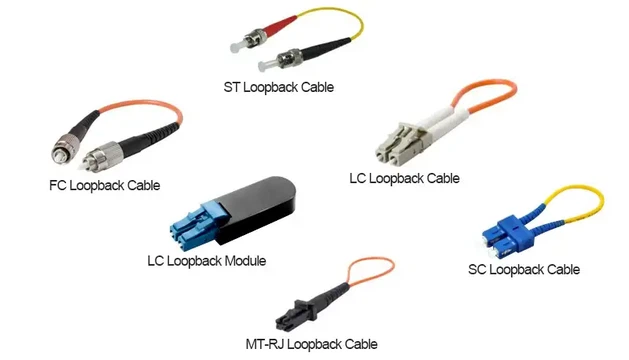
| Loopback cable | Short cable with two connectors joined in a loop | Fiber (LC, SC, FC, ST), serial | General-purpose port and transceiver testing |
| Loopback plug | Compact, single-piece plug | RJ45 (Ethernet), DB-9/DB-25 (serial) | Quick Ethernet or serial port checks |
| Loopback adapter | Varies - may look like a plug or a short cable assembly | Multiple | Broad term; check exact connector compatibility before buying |
| Loopback module | Compact, enclosed module that plugs directly into a transceiver bay or port | MPO/MTP, LC, SC (fiber); SFP/QSFP form factors | High-density fiber racks, transceiver validation, production testing |
The underlying test principle is the same for all four: loop Tx back to Rx and check if the port responds. The differences are in physical form, connector type, and how well the device fits into your specific equipment. When ordering, focus less on the product label and more on exact interface compatibility - connector style, fiber mode, and polish type.
Types of Loopback Cables by Interface
Fiber Optic Loopback Cable
A fiber loopback cable is used to test optical ports, transceivers, and local fiber paths. It typically consists of a short length of fiber with both ends terminated in the same fiber optic connector housing, routing the optical output directly back to the input.
Common connector types include LC, SC, FC, ST, and MPO/MTP. Products are available in both singlemode and multimode versions - and this distinction is critical. Singlemode fiber has a 9 µm core operating at 1310 nm or 1550 nm wavelengths, while multimode fiber uses a 50 µm or 62.5 µm core at 850 nm or 1300 nm. Plugging a singlemode loopback into a multimode port - or vice versa - will produce unreliable results or a complete test failure because of the core size and wavelength mismatch.

Fiber loopback testing is standard practice in telecom, data center, and lab environments. It is especially useful when you need to confirm that an optical transceiver's Tx/Rx path is working before connecting it to a live fiber link.
RJ45 Ethernet Loopback Plug
An RJ45 loopback plug is a compact device that loops specific pin pairs on an Ethernet port - typically connecting pins 1 and 3 (Tx+ to Rx+) and pins 2 and 6 (Tx– to Rx–) for 10/100BASE-T. For Gigabit Ethernet, all four pairs are involved, and the wiring is more complex.
In practice, this is the tool you reach for when a switch port LED is dark or amber and you want to determine whether the port itself is dead before testing the cable run. It is small enough to keep in a toolkit and takes seconds to use. However, an RJ45 loopback only confirms the local port's ability to establish a physical link signal - it does not test the cable plant between devices. That distinction matters, especially if you are comparing loopback results to a full Ethernet cable continuity test.
Serial Loopback Cable (RS-232 / RS-485)
A serial loopback plug connects the transmit data pin to the receive data pin on an RS-232 or RS-485 interface - typically pin 2 (TxD) to pin 3 (RxD) on a DB-9 connector following the TIA-574 pinout. Additional control signal pins (DTR, DSR, CTS, RTS, DCD) are often cross-connected to satisfy handshake requirements (Sealevel: Serial Loopback Adapter Pinouts).
Serial loopback testing remains relevant in industrial automation, telecom infrastructure, and legacy device environments where RS-232 and RS-485 communication is still in active use.
Fiber Loopback Modules for High-Density and Parallel Optics
In high-density optical environments - 40G QSFP+, 100G QSFP28, or 400G QSFP-DD setups - a loopback module is often preferred over a loose loopback cable. These modules are packaged to match the transceiver form factor and plug directly into the port bay, providing cleaner installation and better connector protection in tightly packed racks.
MPO/MTP-based loopback modules are designed for parallel optics testing, where multiple fiber channels transmit simultaneously through a single connector. When selecting one, confirm the fiber count (8-fiber, 12-fiber, or 24-fiber), polarity type, and whether the module matches your transceiver's gender and key orientation. Compliance with standards such as TIA/EIA 604-5 (FOCIS-5) for MPO connectors is a good indicator of manufacturing quality.
When Should You Use a Loopback Cable?
Port Fault Isolation
When a switch port is suspected but the far-end device and cabling are unknown or inaccessible, a loopback test on the local port is the logical first step. If the loopback passes, you can shift your investigation to the cable, the patch panel, or the remote end. If it fails, you have confirmed a local fault without wasting time on the rest of the link.
Transceiver and Optics Acceptance Testing
In fiber acceptance testing - particularly during data center buildouts or when receiving a new batch of SFP/QSFP transceivers - a loopback test confirms that each transceiver's optical Tx/Rx path functions before it goes into production. This is faster and more targeted than waiting until the transceiver is deployed on a live link to discover a failure. A fiber loopback matched to the transceiver connector and fiber mode is essential for this workflow.
Maintenance and Lab Environments
In lab setups, loopback devices allow engineers to test port functionality without requiring a full peer device at the other end. In maintenance windows, a quick loopback check can verify that a port is still healthy after a hardware replacement or firmware upgrade, before reconnecting it to the production network.
Serial Port Validation in Industrial and Telecom Settings
For RS-232 or RS-485 interfaces on industrial controllers, terminal servers, or telecom equipment, a serial loopback plug helps confirm that the port's UART and driver circuitry are operational. This is a standard diagnostic step before investigating protocol or software issues.
What a Loopback Test Can - and Cannot - Tell You
Understanding the boundaries of a loopback test prevents misinterpretation of results.
A loopback test confirms:
- The local port can transmit and receive at the physical layer.
- The transceiver's optical or electrical path is functional.
- The local connector and interface circuitry are intact.
A loopback test does not confirm:
- End-to-end link health between two devices.
- Remote device functionality or configuration.
- Cable plant integrity beyond the local port.
- Higher-layer protocol operation (routing, switching logic, application traffic).
- Optical power budget or insertion loss across the full fiber path.
A common mistake in the field: a port passes a loopback test, and the technician assumes the entire link is healthy. But the remote transceiver might be misconfigured, the fiber run might have excessive bend loss, or there could be a duplex mismatch at the far end. A loopback pass means the local hardware is not the problem - it does not clear anything beyond that point.
How to Choose the Right Loopback Cable
Choosing a loopback device starts with the interface you need to test, not with a product catalog. Use this decision framework:
Step 1: Identify the Port and Connector
| Port Type | Recommended Loopback Product |
|---|---|
| Ethernet (RJ45) | RJ45 loopback plug |
| LC duplex optical port | LC fiber loopback cable or module |
| SC duplex optical port | SC fiber loopback cable |
| MPO/MTP parallel optics | MPO/MTP loopback module |
| Serial (RS-232 DB-9) | DB-9 serial loopback plug |
| Serial (RS-232 DB-25) | DB-25 serial loopback plug |
Step 2: Match Fiber Mode and Wavelength (Fiber Only)
For fiber loopback products, you must match:
- Fiber mode: Singlemode (OS2, 9/125 µm) or multimode (OM3/OM4/OM5, 50/125 µm). Using the wrong mode will cause excessive signal loss or a failed test. For more on these classifications, see our guide to singlemode vs. multimode SFP transceivers.
- Connector type: LC, SC, FC, ST, or MPO/MTP - must physically match the port.
- Polish type: UPC (flat) or APC (angled) - using an APC loopback on a UPC port (or vice versa) causes high return loss and unreliable results. APC connectors are identifiable by their green ferrule.
Step 3: Consider Form Factor
In a lab or field toolkit, a loose fiber loopback cable works fine. In a production data center with high-density patch panels, a compact loopback module is easier to insert, less likely to snag adjacent cables, and protects exposed fiber ends. For MPO breakout cable environments especially, a properly keyed module avoids the polarity confusion that can occur with loose cables.
Step 4: Confirm the Testing Goal
If you need a quick yes/no answer on whether a port is alive, a basic loopback plug is sufficient. If you are running production-grade transceiver validation and need low insertion loss and known optical characteristics, invest in a quality-tested loopback product that ships with measured loss specifications. Quality fiber loopback connectors are typically tested to ANSI/TIA/EIA-455-171 attenuation standards.
How to Use a Loopback Cable: Step-by-Step
1. Define What You Are Testing
Before you plug anything in, state the question clearly. "Is this switch port's SFP+ transceiver transmitting and receiving?" is a testable question. "Is the network working?" is not - a loopback test cannot answer that.
2. Select the Correct Loopback Device
Match the connector, fiber mode, and polish type exactly. If you are testing an LC singlemode port, use an LC singlemode loopback - not an LC multimode, and not an SC singlemode.
3. Inspect and Insert
For fiber connections, inspect the loopback's end faces before insertion. Contaminated connectors are one of the most common causes of false test failures in fiber environments. Use a fiber inspection scope if available, or at minimum a lint-free wipe. Insert the loopback into the target port firmly but without excessive force.
4. Run the Diagnostic
The specific command depends on your platform. On Cisco IOS devices, you might configure loopback external on the interface and then run an extended ping to the interface's own IP address. On other platforms, the vendor's built-in diagnostic utility or a dedicated test application performs the same function. Check for link LED status first - on most equipment, a successful loopback connection will bring the port link light to solid green.
5. Interpret Results Carefully
A pass means the local port's Tx/Rx path is functional at the physical layer. A fail suggests a local hardware issue - the port, the transceiver, or the connector. But do not over-interpret a pass: it does not prove the optical power budget is adequate for the full link, nor does it validate the configuration, the far-end device, or the cable plant in between.
6. Remove, Restore, and Document
After testing, remove the loopback device, reconnect the production cable, and document what the test proved and what it did not. In a maintenance workflow, this documentation prevents the next engineer from re-testing the same port unnecessarily.
Common Mistakes in Loopback Testing
Buying by product name instead of connector specification. A product labeled "fiber loopback adapter" might have LC connectors when you need SC, or it might be singlemode when your port requires multimode. Always verify the exact connector type, fiber mode, and polish before ordering.
Treating a loopback pass as a full network pass. This is the most dangerous misinterpretation. A local loopback confirms the port. It says nothing about the cable run, the far-end device, or the insertion loss across the fiber link. Always follow up with end-to-end testing when validating a complete circuit.
Ignoring fiber mode and polish compatibility. Using a multimode loopback on a singlemode port produces meaningless results. Mixing UPC and APC polish types introduces high back-reflection that can damage some laser sources or corrupt test data. These details matter more than the product label.
Skipping connector inspection. Especially in fiber testing, a single dust particle on a connector end face can degrade signal quality enough to cause a false failure. Clean and inspect before every test.
Assuming every port failure is hardware. If a port fails a loopback test, hardware is a strong suspect. But a software bug, a disabled port configuration, or a transceiver compatibility issue can also produce a test failure. Confirm results with a second known-good loopback device before replacing hardware.
Should You Make Your Own Loopback Cable?
For basic RS-232 serial testing, making a loopback plug from a spare DB-9 connector is straightforward - Sealevel and Oracle both publish verified pinout diagrams for DB-9 and DB-25 loopback wiring (Oracle: Loopback Connector Wiring). A few minutes with a soldering iron gives you a functional tool for lab or learning use.
For fiber loopback devices, DIY is much harder to justify. Fiber connectors require precise polishing, and a poorly finished end face introduces insertion loss and back-reflection that can invalidate test results. In production or acceptance testing where repeatability matters, a factory-tested loopback with documented loss specifications is the safer choice. The cost difference is small relative to the risk of wasted troubleshooting time from an unreliable DIY loopback.
FAQ
Q: Is a loopback cable the same as a patch cable?
A: No. A patch cable connects one device to another, forming a link between two separate ports. A loopback cable routes the signal from a single port's output back to its own input for self-testing. They serve entirely different purposes.
Q: Can a loopback cable test a fiber optic transceiver?
A: It can verify the transceiver's local Tx/Rx optical path - whether the laser transmits and the receiver detects the returned signal. This makes it a fast initial check during transceiver acceptance. However, it does not test the transceiver's behavior across a real fiber link with actual distance, connectors, and optical loss.
Q: Do I need a different loopback for each port type?
A: Yes. An RJ45 loopback plug only works on Ethernet ports. A fiber loopback must match the port's connector (LC, SC, MPO/MTP) and fiber mode (singlemode or multimode). A serial loopback plug is specific to the serial connector pinout. There is no universal loopback device.
Q: Is a loopback cable the same as a network loopback address?
A: No. A loopback cable is a physical piece of hardware used for interface-level diagnostics. A loopback address (such as 127.0.0.1 in IPv4) is a software concept used by the operating system's network stack to send traffic to itself without involving any physical interface. They share the word "loopback" but operate at completely different layers.
Q: What is the difference between an LC loopback module and an LC loopback cable?
A: Both perform the same test - looping LC Tx back to Rx. The difference is packaging. A loopback cable is a short fiber with two LC connectors. A loopback module encloses the fiber loop in a compact housing, often resembling an SFP module's form factor, which is easier to handle in high-density racks and less prone to connector damage.
Q: Can I use a loopback cable to test fiber cable continuity?
A: No. A loopback cable tests the local port and transceiver - the signal never leaves the interface. To test fiber cable continuity, you need tools such as a visual fault locator (VFL), an optical time-domain reflectometer (OTDR), or a light source and power meter pair.
Conclusion
A loopback cable is a focused, efficient tool for one specific job: confirming that a local port or transceiver can transmit and receive at the physical layer. It does not replace end-to-end link testing, configuration validation, or protocol analysis - but it gives you a reliable starting point for fault isolation.
The key to getting useful results is matching the loopback product to your exact interface: the right connector, the right fiber mode, and the right polish type. For Ethernet ports, an RJ45 loopback plug is all you need. For fiber optic environments, match the loopback to the transceiver's connector and wavelength. For high-density parallel optics, use a properly keyed MPO/MTP loopback module that fits the port without ambiguity.
Start with the port. Match the product. Test one variable at a time. That is how loopback testing works best.