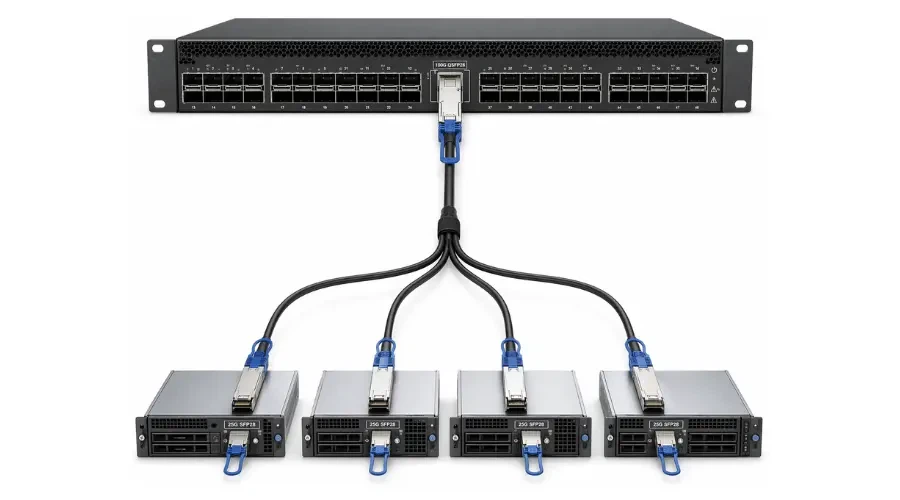
A breakout cable lets you split one high-speed, multi-lane switch port into several lower-speed connections. If you manage data center switches, top-of-rack infrastructure, or server NICs, breakout cables are one of the most practical ways to increase port density without adding hardware. A single 100G QSFP28 port, for example, can serve four 25G server links through one breakout assembly - provided the platform supports breakout mode.
But a breakout cable is not just "a cable that splits." Whether the link actually comes up depends on channelized port support, lane mapping, platform software, and optics compatibility. The connector shape alone does not guarantee breakout will work. This guide covers the types of breakout cables available, how to decide between them, and where buyers most often run into trouble.

What Is a Breakout Cable?
A breakout cable connects one multi-lane port - typically QSFP+, QSFP28, QSFP56, or QSFP-DD - to multiple lower-speed ports, usually in SFP+ or SFP28 form factors. The cable itself carries separate electrical or optical lanes from the high-speed side to each individual lower-speed endpoint.
Behind the cable, breakout mode is the configuration logic on the switch or NIC that divides a single high-speed interface into independent sub-interfaces. According to Cisco's APIC Layer 2 configuration guide, breakout enables a 40G port to be split into four independent 10G ports, a 100G port into four 25G ports, or a 400G port into four 100G ports. Each sub-port operates as its own logical interface with independent traffic forwarding.
Types of Breakout Cables

DAC Breakout Cables (Direct Attach Copper)
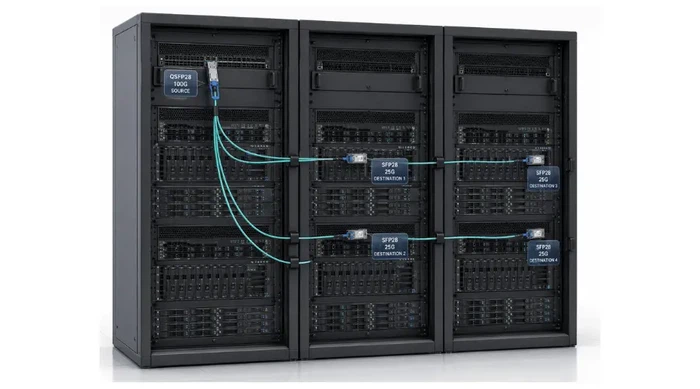
A DAC breakout cable is a passive or active copper twinax assembly with the connectors built in at both ends. DACs are the lowest-cost breakout option and work well for very short links - typically inside a single rack or between adjacent racks. Passive copper breakout DACs are usually available in lengths from 0.5 m to about 5 m. Beyond that, signal attenuation becomes a concern, and active copper versions extend reach to roughly 7–10 m depending on data rate.
Choose DAC when your source port and destination ports are within the same rack or the next rack over, cost is the primary concern, and you do not need to worry about cable bulk or airflow restrictions. For example, connecting a 100G QSFP28 top-of-rack switch to four 25G SFP28 server NICs in the same cabinet is a textbook DAC breakout scenario.
AOC Breakout Cables (Active Optical Cable)
An AOC breakout cable is an optical assembly with transceivers integrated into each end. AOCs are thinner and lighter than copper DACs, which helps with airflow in dense rack environments. According to NVIDIA's LinkX AOC product page, AOCs support the same splitter configurations as DAC cables but offer longer reach (up to 30–100 m), greater flexibility, and better airflow characteristics.
Choose AOC when your links run between racks across a row or between rows, when cable weight and bend radius matter in dense cabling trays, or when your team wants an integrated assembly without separate fiber optic connectors to clean and inspect.
Breakout with Transceivers and Fiber Harnesses
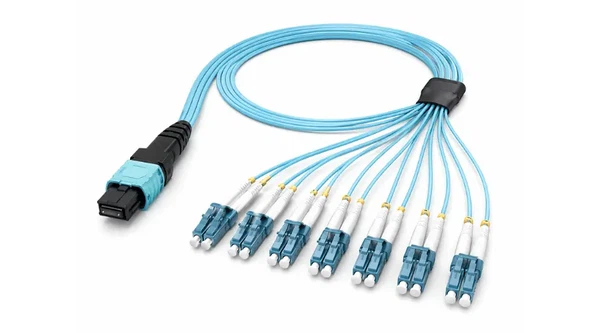
The third approach uses breakout-capable transceivers (such as SR4, PSM4, or DR4 modules) paired with MPO/MTP breakout fiber harnesses. These harnesses fan out from a single MPO-12 or MPO-16 connector to multiple duplex LC or SC connectors. The Cisco breakout white paper details how transceivers such as the QSFP-40G-SR4 and QSFP-100G-SR4-S use MPO-12 connectors for breakout in both multimode and single-mode fiber applications.
This option offers the most flexibility - you can mix and match transceivers and fiber lengths independently - but it also adds more components. Every connector interface introduces potential insertion loss, and each transceiver-to-harness pairing needs its own compatibility check.
DAC vs AOC vs Transceivers + Harness vs QSA: Quick Comparison
| Option | Best For | Typical Reach | Key Trade-off |
|---|---|---|---|
| DAC breakout | Intra-rack or adjacent-rack links | 0.5–5 m (passive), up to 10 m (active) | Lowest cost, but bulky cables and limited reach |
| AOC breakout | Inter-rack links, dense cabling environments | 3–100 m | Lighter and longer reach, but higher cost than DAC |
| Transceivers + fiber harness | Structured cabling, mixed-vendor or upgrade scenarios | Depends on optics (MMF up to 100 m, SMF up to 10 km+) | Most flexible, but more components and cleaning required |
| QSA adapter | Using one SFP/SFP+ link from a QSFP port | Same as the SFP module used | Simple one-port conversion, not a one-to-many breakout |
How to Choose the Right Breakout Cable?

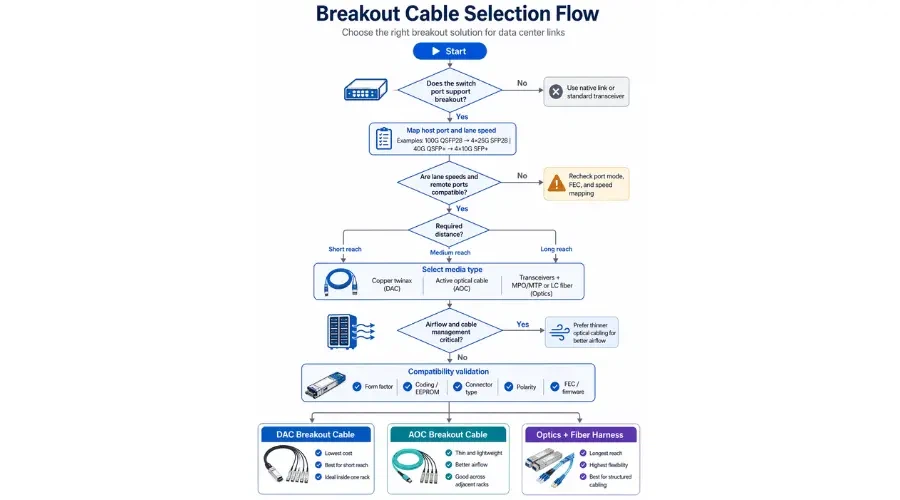
Step 1: Confirm That Your Port Supports Breakout
This is where most buying mistakes happen. Not every QSFP or QSFP-DD port can operate in breakout mode. Support depends on the switch ASIC, line card model, and software release. On Cisco Nexus platforms, for instance, you can verify breakout capability per port using the command show interface ethernet [slot/port] capabilities and looking for "Breakout capable: yes" in the output. If the port does not support breakout, the link will not come up regardless of what cable you connect.
Before purchasing, check your vendor's platform documentation. Cisco provides the Optics-to-Device Compatibility Matrix for verifying transceiver and breakout support across its product lines. NVIDIA publishes cable compatibility guidance in its Cable Management Guidelines and FAQ.
Step 2: Verify the Lane Count and Speed Mapping
Confirm the exact breakout mapping you need - not just the headline port speed. Common mappings include 40G to 4×10G (QSFP+ to 4×SFP+), 100G to 4×25G (QSFP28 to 4×SFP28), 200G to 4×50G, and 400G to 4×100G (QSFP-DD to 4×QSFP28). Some newer 400G modules also support 8×50G or 2×200G splits depending on the transceiver design.
At higher speed generations, encoding matters too. A 100G link using 4×25G NRZ signaling behaves differently from a 200G link using 4×50G PAM4 lanes. Make sure the breakout mapping matches both ends of the link - the switch port configuration and the remote device's interface speed.
Step 3: Match Media Type, Connector, and Reach
Once you know the speed mapping, decide whether you need copper or optical. For links under 3–5 m inside a rack, DAC is usually the simplest and cheapest answer. For links between 3 m and 100 m, AOC or multimode fiber with SR transceivers will cover the distance. For anything beyond 100 m, you will need single-mode optics and a fiber harness designed for the right MPO/MTP connector polarity and fiber count.
Step 4: Factor in Airflow, Power, and Cable Management
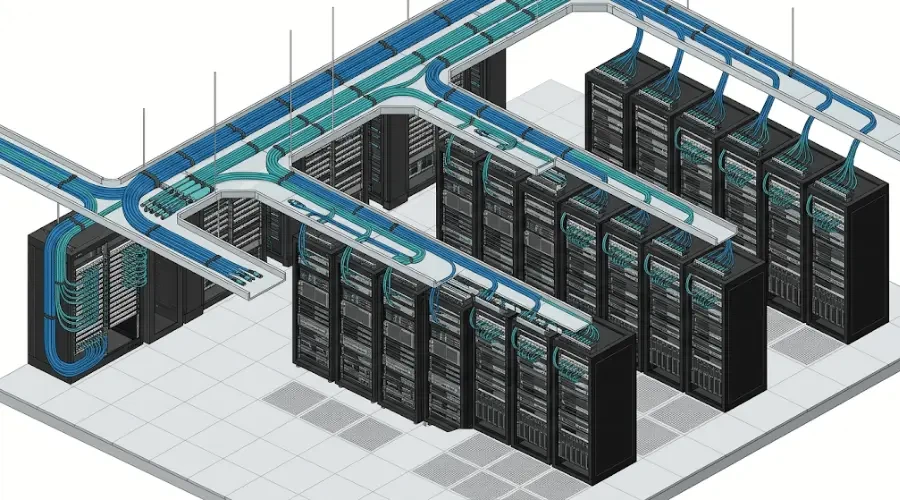
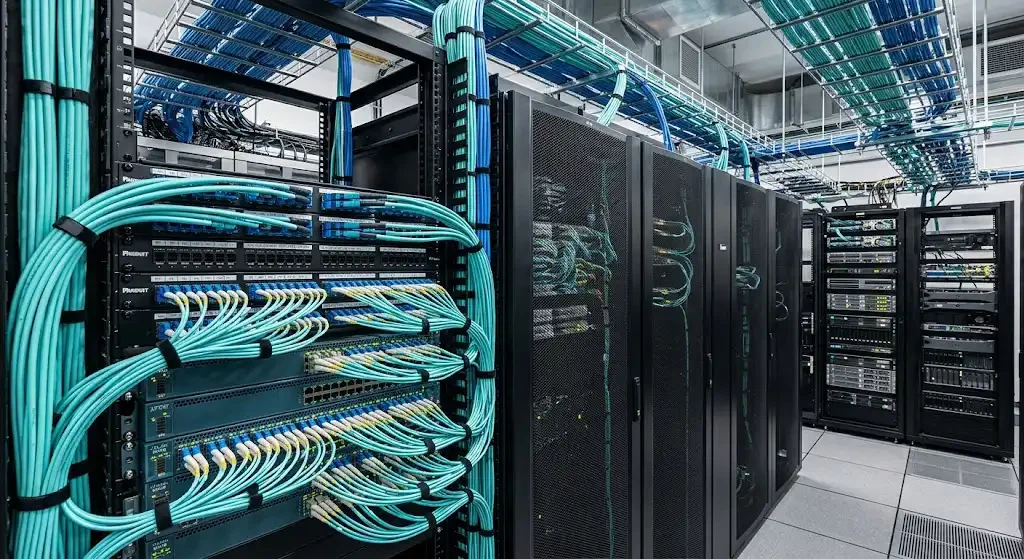
In high-density deployments - 40+ servers per rack, multiple breakout cables per switch - cable bulk becomes an operational concern. Copper DAC bundles are stiffer and take up more space in cable trays. AOCs and fiber harnesses are significantly thinner and lighter, which helps maintain front-to-back airflow in enclosed cabinets. If your facility runs hot or your racks are near capacity, cable weight and diameter should factor into your decision alongside cost and reach.
Step 5: Validate Compatibility Before Ordering
Even after confirming port support and speed mapping, run a final compatibility check. Verify that the specific cable part number or transceiver model is listed as supported on your platform and software version. In mixed-vendor environments - for example, a Cisco switch connecting via breakout to servers with NVIDIA ConnectX NICs - confirm interoperability from both sides. The Cisco Optics-to-Optics Interoperability Matrix can help verify transceiver-to-transceiver compatibility for these scenarios.
Common Breakout Configurations
40G QSFP+ to 4×10G SFP+: The original and most widely deployed breakout configuration. Typically used to connect a 40G uplink switch port to four 10G server NICs or access switches within the same rack. Both DAC and AOC versions are widely available, and most current-generation switches support this mapping.
100G QSFP28 to 4×25G SFP28: The most common breakout in newer data center builds. A single 100G spine or leaf port fans out to four 25G server-facing SFP28 connections, providing 4× the port density from one high-speed interface. This is the go-to configuration for 25G server refresh projects.
400G QSFP-DD to 4×100G QSFP28: Emerging in spine-to-leaf fabrics where 400G uplinks need to distribute bandwidth to 100G leaf switches. Supported on platforms such as the Cisco Nexus 9300-GX2 series with specific transceiver models like the QDD-4X100G-FR-S.
If you are working with MPO/MTP-based structured cabling rather than direct-attach assemblies, our MPO breakout cable guide covers fiber harness selection in more detail, and the MPO cable types comparison explains when to use trunk cables versus breakout harnesses.
Breakout Cable vs QSA Adapter
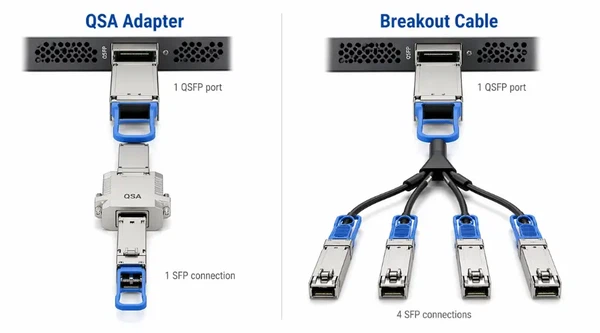
A QSA (QSFP-to-SFP Adapter) is not a breakout cable. It is a mechanical adapter that converts a single QSFP port into a single SFP or SFP+ port. Cisco's documentation on the CVR-QSFP-SFP10G describes it as an adapter that provides 10G or 1G Ethernet connectivity from a QSFP-only port. The key difference: a QSA gives you one lower-speed link from a QSFP port, while a breakout cable gives you multiple lower-speed links.
Use a QSA when you only need a single lower-speed connection from a QSFP port - for example, connecting one 10G management link. Use a breakout cable when you want to maximize the port's lane capacity by serving four (or more) endpoints simultaneously.
Breakout Cable vs Separate Optics and Patch Cabling
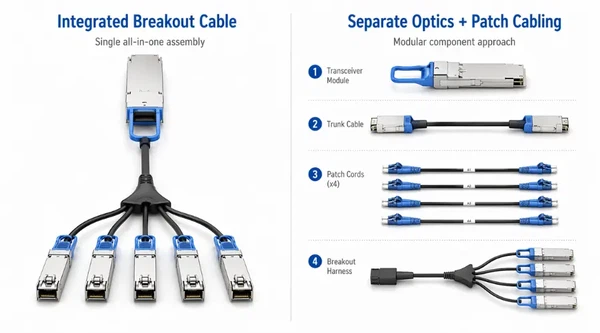
A breakout cable (DAC or AOC) is an integrated assembly - simpler to deploy and fewer components to manage. Separate optics with trunk cables and breakout harnesses offer more flexibility, especially in structured cabling environments where you want to reuse existing fiber plant or swap transceivers independently. The trade-off is additional components: each fiber optic adapter and connector adds an insertion loss point and a cleaning step during maintenance.
For greenfield deployments with short, predictable link distances, integrated breakout cables (DAC or AOC) are usually faster to install. For brownfield upgrades or environments with existing MPO/MTP cabling infrastructure, a transceiver-plus-harness approach often makes more sense.
Benefits and Limitations
Breakout cables deliver real advantages: higher utilization of expensive high-speed ports, increased connection density per rack unit, and a smoother incremental migration path. Instead of replacing an entire switch to get more 25G ports, you can break out existing 100G ports to serve four 25G endpoints each.
The limitations are worth understanding too. A breakout assembly ties multiple links into one physical cable - if that cable fails or needs replacement, all four (or more) sub-links go down together. Breakout is also less flexible than individual single-lane ports when you need to route each connection differently or mix speeds on a per-lane basis. And not every port supports every breakout mapping, so your configuration options are bounded by the platform's ASIC and firmware capabilities.
Pre-Purchase Checklist
Before ordering a breakout cable, confirm each of the following:
- Port breakout support: Is the specific port on your switch or NIC confirmed breakout-capable for your target speed mapping? Check the vendor's platform documentation or compatibility tool.
- Speed mapping: Does the breakout pattern (e.g., 4×25G, 4×10G, 4×100G) match both the source port and the remote interfaces?
- Media type and reach: Is the link distance within DAC range (under 5 m), AOC range (3–100 m), or does it require fiber with separate transceivers?
- Software version: Is the switch or NIC running a firmware release that supports the breakout configuration you need?
- Optics compatibility: If using transceivers plus fiber, are both the transceiver model and the patch cord or harness validated for your platform?
- Cable management: Will the cable type (copper vs optical) fit within your rack's airflow and cable routing constraints?
Frequently Asked Questions
Can every QSFP port use a breakout cable?
No. Breakout requires channelized port support in the switch ASIC or NIC firmware. Many platforms restrict breakout to specific port numbers or line card models. Always verify per-port breakout capability in your vendor's documentation before purchasing.
Does a breakout cable increase total bandwidth?
No. A breakout cable redistributes the existing bandwidth of one high-speed port across multiple lower-speed links. A 100G port broken out to 4×25G still delivers 100G of aggregate throughput - it does not create additional capacity beyond what the original port provides.
What is the difference between a 40G-to-4×10G and a 100G-to-4×25G breakout?
Both follow the same principle of splitting one multi-lane port into four independent links, but they operate at different speed generations. A 40G-to-4×10G breakout uses QSFP+ and SFP+ form factors with 10G NRZ signaling per lane. A 100G-to-4×25G breakout uses QSFP28 and SFP28 with 25G NRZ signaling per lane. The cables are physically similar but electrically different and not interchangeable.
When should I use a QSA adapter instead of a breakout cable?
Use a QSA when you only need one lower-speed connection from a QSFP port. A QSA converts the port to accept a single SFP/SFP+ or SFP28 module. If you need to serve multiple endpoints from one port, a breakout cable is the right tool.
How do I check whether my switch and breakout cable are compatible?
Start with your switch vendor's compatibility matrix. For Cisco platforms, use the Optics-to-Device Compatibility Matrix and enter your switch model and the breakout cable or transceiver part number. For NVIDIA/Mellanox switches, consult the firmware release notes and the cable compatibility tables in NVIDIA's documentation. When in doubt, test with a single port before deploying at scale.
What is the difference between a DAC breakout cable and an AOC breakout cable?
A DAC breakout uses copper twinax conductors and is best for very short distances (typically under 5 m). An AOC breakout uses integrated optical components and supports longer distances (up to 100 m), with thinner, lighter cabling that improves airflow. DAC costs less; AOC reaches further and handles better in dense environments.
Final Takeaway
Breakout cables are one of the most efficient ways to maximize port density and simplify cabling in data center networks - but only when the underlying hardware and configuration support them. Start by confirming breakout capability on your specific switch model and port. Then match the speed mapping to your deployment needs, choose between copper and optical based on reach and rack conditions, and validate full compatibility before ordering.
If you are planning an MPO/MTP-based fiber deployment that includes breakout harnesses, explore our MPO/MTP breakout cable products or contact our team for configuration guidance tailored to your network design.